Trace your agent's syscalls with eBPF, then deny the rest
 ++
- 1Lock down Docker networks
- 2Run containers as non-root
- 3Identity in front of every port
- 4Membership, not just an account
- 5An identity for the agent, not a key
- 6A tool server that checks who is asking
- 7Where the agent can go, not just what it can call
- 8Move the daemon off root
- 9Run the model's own code without trusting it
- 10A scope per tool, and a refusal clients can act on
- 🏆Deny the syscalls your agent never makes
Part 9 put the code your agent writes inside a
box: no network, capped memory and processes, a read-only disk, and --cap-drop=ALL. Every
one of those limits held. But it left one door open, the same one almost every sandbox guide
leaves open, because closing it takes work: seccomp was left at its default, and the moment
you need to run the container with --security-opt seccomp=unconfined — which plenty of
runtimes and GPU stacks ask for — the entire system-call surface of the kernel is back.
This post closes that door. We record the system calls the agent actually makes, using eBPF, and turn that recording into a profile that allows exactly those and returns an error for everything else. Then we do the same idea one layer up with AppArmor, to control which programs the agent can execute at all.
Everything here runs on one host with Docker 29.1.3, kernel 5.15, cgroup v2, and both
seccomp and apparmor listed under docker info's security options. Nothing needs an
inference API — this is pure host hardening.
The gap Part 9 left open
A system call is how a process asks the kernel to do anything real — open a file, map memory,
create a namespace. seccomp (secure computing mode) filters that list: the kernel checks
each syscall against a profile and either allows it or returns an error. Docker ships a
default profile that blocks around 44 of
the 300-plus syscalls. Here is one of them, and why it matters:
# Default Docker profile
docker run --rm python:3.12-alpine unshare -Ur id
# unshare: unshare(0x10000000): Operation not permitted

# seccomp disabled
docker run --rm --security-opt seccomp=unconfined python:3.12-alpine unshare -Ur id
# uid=0(root) gid=0(root) groups=0(root),0(root),65534(nobody),...
 Figure 1: The gap —
seccomp=unconfined lets the agent unshare into a user namespace and become root. The default profile blocks the syscall.
0x10000000 is CLONE_NEWUSER. With seccomp off, the agent creates a user namespace and
is uid=0(root) inside it — with --cap-drop=ALL and --security-opt no-new-privileges
still set. Unprivileged user namespaces are one of the most productive kernel attack surfaces
there is; a long line of privilege-escalation CVEs is reachable only once you can call
unshare(CLONE_NEWUSER). The default profile blocks the syscall outright. unconfined hands
it back.
So the default profile is good. The problem is that it is generic — it has to keep almost every container image working, so it allows far more than any single agent needs. We can do better: allow only what this agent calls, and nothing else.
Record what the agent actually uses
To build that allowlist we need to watch the agent run and note every syscall it makes. We use
Inspektor Gadget, which does the watching with eBPF —
in-kernel instrumentation — and ships a gadget, advise_seccomp, that turns the recording
straight into a Docker seccomp profile. It installs as a single static binary:
IG_VERSION=$(curl -s -4 https://api.github.com/repos/inspektor-gadget/inspektor-gadget/releases/latest | grep -oP '"tag_name":\s*"\K[^"]+')
curl -sL -4 "https://github.com/inspektor-gadget/inspektor-gadget/releases/download/${IG_VERSION}/ig-linux-amd64-${IG_VERSION}.tar.gz" | sudo tar -C /usr/local/bin -xzf - ig
ig version   # v0.57.0
curl -4 forces IPv4. Without it the download hangs — the same reason npm and yarn need
--dns-result-order=ipv4first here. If your host has working IPv6 you can drop the flag.
Now the recording. The gadget prints its profile when it stops, for the containers still running at that moment, so three things have to line up: the recorder runs in the foreground (backgrounded, it prints nothing — the first of several sharp edges, all in Troubleshooting); the container stays alive long enough to be captured; and — the part that cost the most — the recorder must already be running before the container starts, so it sees the process come up. We start the container on a short delay in the background, and run the recorder in the foreground with a fixed timeout:
( sleep 3; docker run -d --rm --name agent --network none --read-only --tmpfs /tmp:size=16m \
    --cap-drop=ALL --security-opt no-new-privileges --security-opt seccomp=unconfined \
    python:3.12-alpine sh -c "python -c 'import math,json;json.dumps({\"n\":len([math.sqrt(i) for i in range(5000)])})'; sleep 30" ) &

sudo ig run advise_seccomp:latest --timeout 12 --containername agent | tee agent.seccomp.out
tail -n +2 agent.seccomp.out > agent-seccomp.json   # drop the leading "// agent" comment line
The result is a real Docker seccomp profile: deny by default, with an allowlist of just the syscalls the agent made.
{
  "defaultAction": "SCMP_ACT_ERRNO",
  "architectures": ["SCMP_ARCH_X86_64", "SCMP_ARCH_X86", "SCMP_ARCH_X32"],
  "syscalls": [
    {
      "names": ["arch_prctl","brk","capget","capset","chdir","clock_gettime","close",
        "close_range","epoll_ctl","epoll_pwait","execve","exit","exit_group","faccessat2",
        "fcntl","fork","fstat","fstatfs","futex","getcwd","getdents64","getegid","geteuid",
        "getgid","getpid","getppid","getrandom","gettid","getuid","ioctl","lseek","madvise",
        "mmap","mprotect","mremap","munmap","nanosleep","newfstatat","open","openat","openat2",
        "prctl","read","readlink","recvfrom","rt_sigaction","rt_sigprocmask","rt_sigreturn",
        "set_tid_address","setgid","setgroups","setrlimit","setuid","sigaltstack","stat",
        "statx","tgkill","wait4","write"],
      "action": "SCMP_ACT_ALLOW"
    }
  ]
}
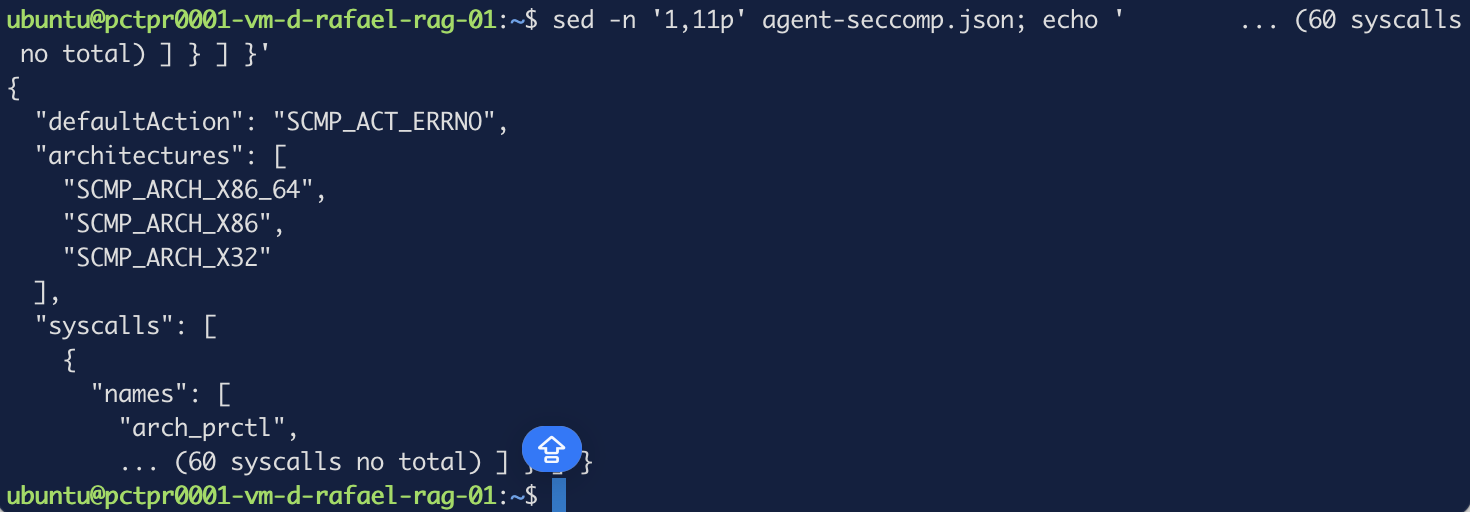 Figure 2: The generated profile — deny-by-default (
SCMP_ACT_ERRNO) with an allowlist of the 60 syscalls Inspektor Gadget saw the agent make.
Sixty syscalls, down from the three hundred-plus the kernel exposes. unshare is not among
them — which is the whole point.
The profile that looked right and killed the container
The first time through, I recorded against a container that was already running — I started the agent, let it settle, then started the recorder. That produced a clean-looking profile with 33 syscalls. Applying it did not go well:
docker run --rm --security-opt seccomp=agent-seccomp.json ... python:3.12-alpine python -c "print('hi')"
# docker: Error response from daemon: bind-mount /proc/<pid>/ns/net -> .../netns/...: no such file or directory
A networking error, from a --network none container. The container was dying so fast that by
the time the daemon went to wire up its network namespace, the process was already gone. Switch
the profile's default action from SCMP_ACT_ERRNO to SCMP_ACT_KILL_PROCESS and the message
gets honest:
# docker: Error response from daemon: OCI runtime start failed: container process is already dead
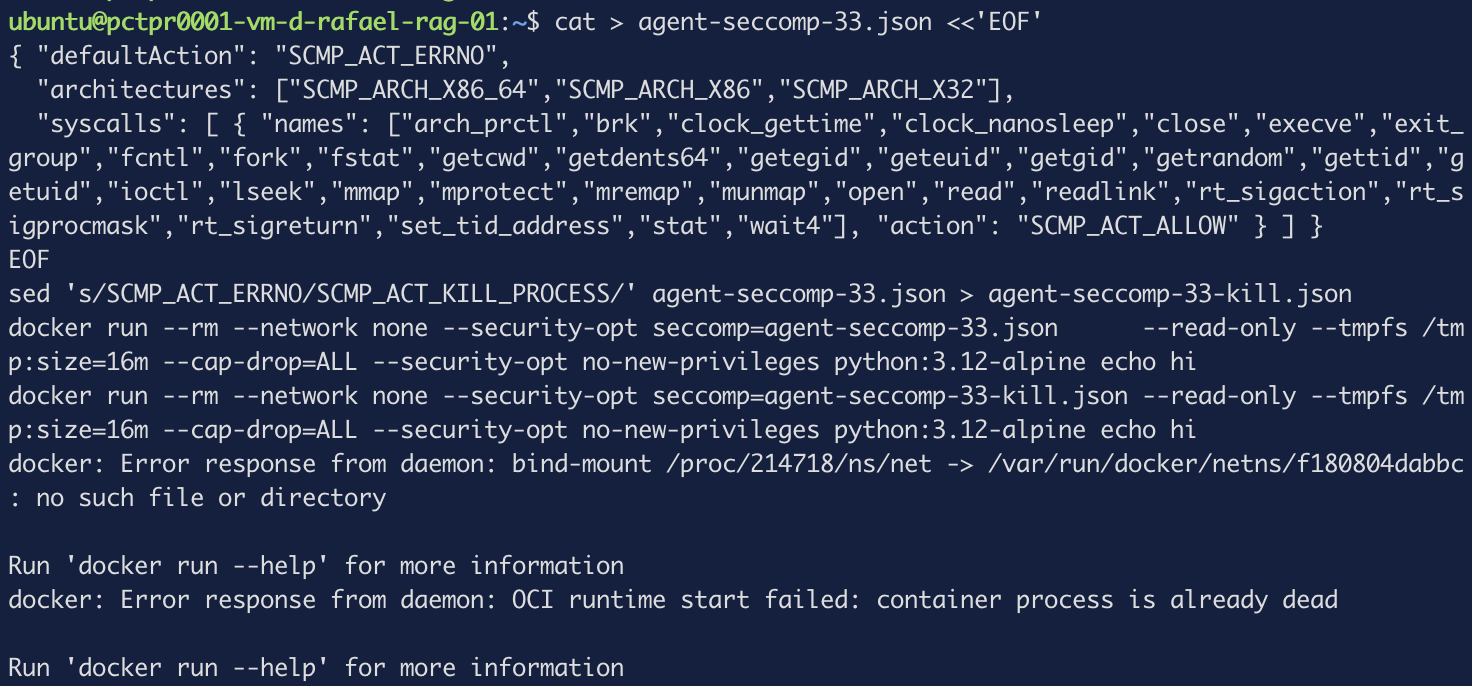 Figure 3: The too-minimal profile kills the container during startup — a
netns error under ERRNO, and an honest "process is already dead" under KILL_PROCESS.
The minimal profile was killing the container during startup. To prove it was the profile and
not the host, set the default action to SCMP_ACT_LOG — allow everything, just log what falls
outside the allowlist — and the exact same workload runs fine. So the allowlist was missing
syscalls the container needs to start.
And it was, because of when I recorded. The 33-syscall run captured the agent's
steady-state loop but never saw it come up. Recording from the container's first instruction
instead — the ( sleep 3; docker run ... ) & trick above — added 25 syscalls the earlier run
never saw:
capget capset futex openat openat2 newfstatat faccessat2 statx prctl nanosleep write
getpid getppid setuid setgid setgroups setrlimit chdir close_range fstatfs epoll_ctl ...
Look at capset, setuid, setgid, setgroups: that is runc dropping privilege as the
container initialises — and critically, it happens after the seccomp filter is installed, so
those syscalls must be in the profile or the container never finishes booting. futex,
openat, newfstatat are the C library's normal startup. None of them appear in a trace that
begins after the process is already up.
With the full 60-syscall profile, the agent runs and the escalation is gone:
# the agent's normal work — allowed
docker run --rm --network none --security-opt seccomp=agent-seccomp.json --read-only \
  --tmpfs /tmp:size=16m --cap-drop=ALL --security-opt no-new-privileges \
  python:3.12-alpine python -c "print('agent ok')"
# agent ok

# the user-namespace escalation — now blocked by our own profile
docker run --rm --network none --security-opt seccomp=agent-seccomp.json --read-only \
  --tmpfs /tmp:size=16m --cap-drop=ALL --security-opt no-new-privileges \
  python:3.12-alpine unshare -Ur id
# unshare: unshare(0x10000000): Operation not permitted
 Figure 4: The complete profile — recorded from container start — lets the agent run and blocks the user-namespace escalation.
The lesson generalises past this one workload: a profile is only as complete as the paths you exercised while recording. Record from container start, and drive the agent through every branch it will take in production — if a code path never ran during the trace, its syscalls are not in the profile, and it will fail the first time a user hits it. Treat the generated profile as a tested starting point you widen deliberately, not a finished artifact.
AppArmor: which programs, not just which syscalls
seccomp filters syscalls. AppArmor works a layer up: it governs what a process may do to objects — which files it reads and writes, and which binaries it may execute. That last one is a containment seccomp does not express cleanly, and it is exactly what you want against an agent that runs generated code: let it run Python, but do not let it shell out.
AppArmor is already active here — docker info lists it, and sudo aa-status shows the
docker-default profile applied to every running container. We write a tighter one, based on
the template in Docker's docs:
#include <tunables/global>

profile agent-confined flags=(attach_disconnected,mediate_deleted) {
  #include <abstractions/base>
  network, capability, file, umount,

  audit deny /bin/busybox x,
  audit deny /bin/sh x,
  audit deny /usr/bin/busybox x,
}
Load it into the kernel and run against it:
sudo apparmor_parser -r -W agent-confined.aa

# the agent runs Python — but os.system() tries to exec a shell
docker run --rm --security-opt apparmor=agent-confined \
  python:3.12-alpine python -c "import os;print('rc=',os.system('id'))"
# rc= -1          <- the shell exec was denied; id never ran

# the same thing under docker-default, for contrast
docker run --rm --security-opt apparmor=docker-default \
  python:3.12-alpine python -c "import os;print('rc=',os.system('id'))"
# uid=0(root) gid=0(root) groups=0(root),...
# rc= 0
 Figure 5: AppArmor controls which binaries run. Under
agent-confined, Python cannot shell out (rc= -1); under docker-default it can.
Under agent-confined, Python runs but cannot launch /bin/sh, so os.system('id') returns
-1 and id never executes. Under docker-default the shell-out works. The agent's own job
is untouched; its ability to spawn a subprocess is gone.
deny rule logs nothing — until you ask it toMy first version used deny /bin/busybox x. It blocked the exec correctly, but dmesg stayed
empty: an explicit AppArmor deny is silent by design. Prefix it with audit and the kernel
records every violation:
sudo dmesg | grep DENIED | tail -1
# apparmor="DENIED" operation="exec" profile="agent-confined" name="/bin/busybox"
#   comm="python" requested_mask="x" denied_mask="x" fsuid=0 ouid=0
 Figure 6: With
audit deny, the kernel logs every blocked exec — here, python caught trying to launch /bin/busybox.
Now you can see the agent trying to shell out. (seccomp denials, by contrast, did not reach
dmesg on this host — its audit daemon is off. AppArmor's do.)
Troubleshooting
Real errors hit while building this, and what fixed them:
- The recorder prints nothing when backgrounded.
sudo ig run ... &with redirected output produced zero bytes for every gadget. Runigin the foreground with--timeout N, and generate the workload during that window (hence the delayed container start in the background instead). --rmcontainers vanish before the profile prints.advise_seccompreports on containers still running when it stops. A short-lived--rmcontainer is already gone, so you get nothing. Keep it alive (sleep) past the recorder's timeout.pkill -f advise_seccompkills your own script. The pattern matched the shell command that contained the string. Stop the recorder by exact process name:sudo pkill -INT -x ig— or just use--timeoutand avoid signalling entirely.-o advise:textis rejected (output mode "text" ... not supported). The default output already renders the profile; the advise data source's mode isadvise, nottext.- The profile kills the container at startup with a
netnsbind-mount error orcontainer process is already dead. The allowlist is missing startup syscalls — you recorded too late. Record from the container's first instruction.
Where this leaves you
Part 9 took away the agent's resources and capabilities. This part takes away the syscalls it never uses and the programs it should never run — the two lower layers of the same box. An agent that executes model-written code can now do its own work and nothing else: no user namespace to climb into, no shell to spawn, and a kernel surface measured in dozens of syscalls instead of hundreds.
Keep the profiles under version control next to the service, record them from container start, and re-record whenever the agent gains a genuinely new capability. Next in the series: the container supply chain — verifying image signatures, scanning before run, and pinning to immutable digests, so the image you hardened is the image you actually run.