Sandbox the code your agent writes, and prove every limit actually applied

- 1Lock down Docker networks
- 2Run containers as non-root
- 3Identity in front of every port
- 4Membership, not just an account
- 5An identity for the agent, not a key
- 6A tool server that checks who is asking
- 7Where the agent can go, not just what it can call
- 8Move the daemon off root
- 9Run the model's own code without trusting it
- 🏆A scope per tool, and a refusal clients can act on
Every agent tutorial in this series so far has given a model tools — functions you wrote, with arguments you defined. This post is about the other thing agents do, which is write code and then run it.
That is a different risk, and the difference is worth being precise about. A tool call is the model choosing from a menu you control. Executing generated code is the model handing you something nobody has ever read, which you then run on your machine.
One WEC Instance: 8 vCPU AMD EPYC 7601, 15 GB RAM, Ubuntu 22.04, kernel 5.15, systemd 249.
Docker rootless 29.8.1 from Part 8, running
alongside the system daemon. Test image is python:3.12-alpine. The host had 20 containers
running throughout.
Every number and error message below is from that run.
Why this needs its own post
The industry has a name for this. OWASP's LLM05:2025 Improper Output Handling lists it as a vulnerability example, in plain words:
LLM output is entered directly into a system shell or similar function such as exec or eval, resulting in remote code execution.
And its advice on how to think about the model is exactly right:
Treat the model as any other user, adopting a zero-trust approach
Here is what makes that page worth reading closely, though. It tells you to treat model output as untrusted, it names code execution as the consequence, and then its prevention section talks entirely about validating text — output encoding, parameterised queries, content security policies, monitoring.
Search that page for sandbox, container, least privilege or isolation and you get zero hits. Not few. None.
That is not a criticism of OWASP; the risk is about output handling, and validation is the right answer for output that becomes HTML or SQL. But when the output is a program you are about to run, validation stops being possible. You cannot regex your way to knowing whether a hundred lines of Python are safe.
So the guidance names the problem and stops one layer above the fix. This post is that layer.
What the obvious version actually allows
The naive implementation is what most people ship first, and it looks responsible — the code runs in a container, after all:
docker -c rootless run --rm python:3.12-alpine python -c "<the model's code>"
Let's ask that container what it can reach.
docker -c rootless run --rm python:3.12-alpine python -c "
import os, urllib.request
print('uid inside     :', os.getuid())
print('can see host / :', sorted(os.listdir('/'))[:10])
try:
    r = urllib.request.urlopen('https://api.github.com', timeout=5)
    print('internet       : REACHED', r.status)
except Exception as e:
    print('internet       : blocked', type(e).__name__)
"

docker -c rootless run --rm python:3.12-alpine sh -c '
echo "memory limit : $(cat /sys/fs/cgroup/memory.max)"
echo "pids limit   : $(cat /sys/fs/cgroup/pids.max)"
echo "cpus visible : $(nproc)"
echo "writable fs  : $(touch /proc-test 2>/dev/null && echo yes || echo no)"
'
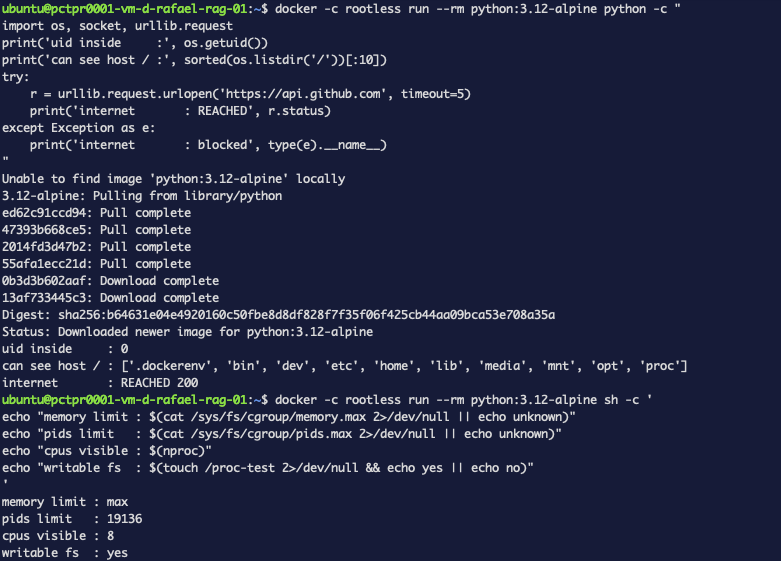
internet       : REACHED 200
memory limit : max
pids limit   : 19136
cpus visible : 8
writable fs  : yes
Read that as a list of what generated code is allowed to do on your machine:
- Reach the internet. Anything it finds, it can send somewhere.
- Take all the memory.
maxmeans no limit. On this host that is 15 GB, and the kernel will start killing other things to provide it. - Start 19,136 processes. Enough to make the host unusable.
- Use all eight cores.
- Write anywhere in the container, including filling the disk.
Part 8 moved the daemon off root, so this code can no longer take over the host. That was worth doing and it does not help here at all. None of the five items above involves being root.
Closing it down
Docker has flags for every one of these. They are unglamorous and they are the entire fix:
docker -c rootless run --rm \
  --network none --memory 256m --pids-limit 64 --cpus 0.5 \
  --read-only --tmpfs /tmp:size=16m \
  --cap-drop=ALL --security-opt no-new-privileges \
  python:3.12-alpine <command>
In plain terms:
| Flag | What it stops |
|---|---|
--network none | No network at all — nothing can be sent anywhere |
--memory 256m | Uses more than 256 MB and the kernel kills it, not your other services |
--pids-limit 64 | A fork bomb hits 64 and stops |
--cpus 0.5 | An infinite loop gets half a core |
--read-only | Nothing can be written to the container's filesystem |
--tmpfs /tmp:size=16m | Except a small scratch area, capped, in memory |
--cap-drop=ALL | No kernel privileges — no mounting, no raw sockets, nothing |
--security-opt no-new-privileges | Nothing inside can gain more privileges than it started with |
Run it, and it fails before the container even starts:
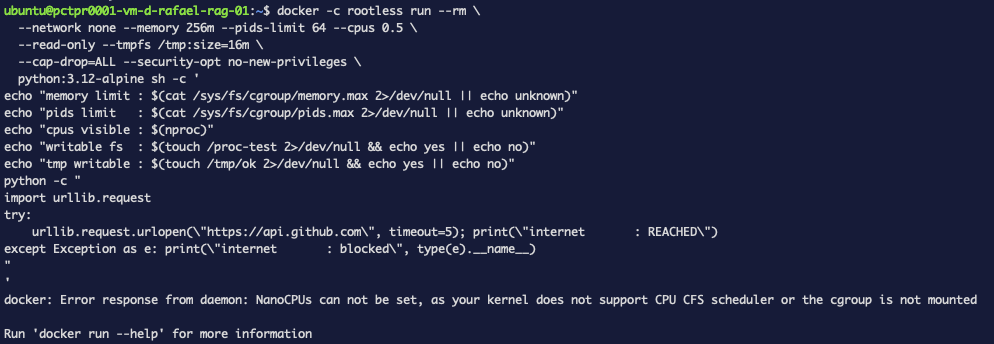
docker: Error response from daemon: NanoCPUs can not be set, as your kernel does not
support CPU CFS scheduler or the cgroup is not mounted
Hold onto that message, because it is misleading. The kernel supports CPU limits perfectly well — this host runs 20 other containers with them available. We will come back to what is actually wrong.
Drop --cpus and everything else applies:
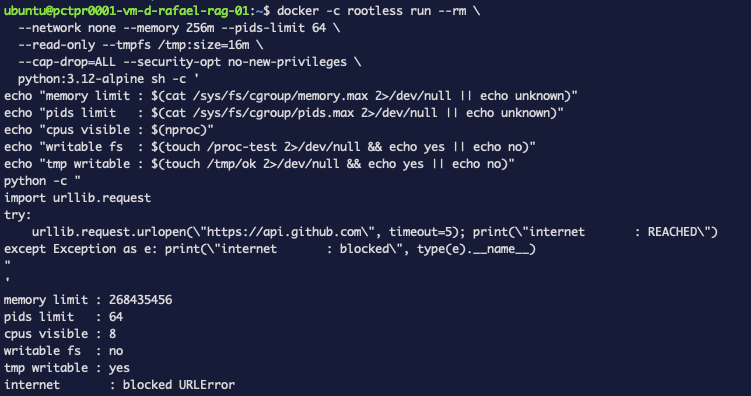
memory limit : 268435456        <- exactly 256 MiB
pids limit   : 64
cpus visible : 8
writable fs  : no
tmp writable : yes
internet     : blocked URLError
Five of six controls working. And cpus visible: 8, because we were not allowed to set one.
Proving the gap is real
A missing CPU limit sounds mild next to "unlimited memory". It is not, because an infinite loop is the single most likely thing generated code does by accident.
This runs eight busy loops inside the otherwise fully locked-down sandbox, for eight seconds:
docker -c rootless run -d --name burn \
  --network none --memory 256m --pids-limit 64 \
  --read-only --tmpfs /tmp:size=16m \
  --cap-drop=ALL --security-opt no-new-privileges \
  python:3.12-alpine sh -c 'for i in $(seq 8); do (while :; do :; done) & done; sleep 8'
sleep 3
docker -c rootless stats --no-stream burn
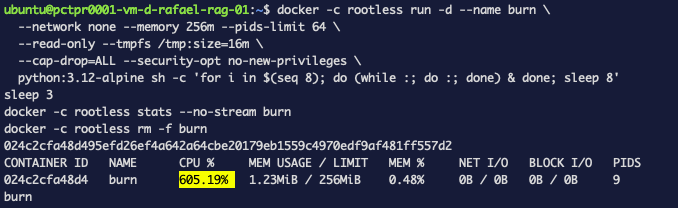
NAME   CPU %     MEM USAGE / LIMIT   NET I/O   PIDS
burn   605.19%   1.23MiB / 256MiB    0B / 0B   9
605% of a CPU. Six of the host's eight cores, taken by code inside a sandbox where memory is capped at 256 MB (it used 1.23), processes are capped at 64 (it used 9), and the network is completely blocked.
Every control we set is working. The one we could not set is the one being abused.
What is actually wrong
The error message blamed the kernel. The kernel is fine. The real answer is one file.
When Docker runs rootless, it does not get to manage resources directly — it can only use what the system has handed to your user account. On modern Linux that handover is called cgroup delegation, and systemd decides what gets delegated.
cat /sys/fs/cgroup/user.slice/user-1000.slice/cgroup.controllers
memory pids
Two things. That is the whole explanation:
The daemon knew all along. It said so at startup, ten times, in lines nobody reads:
journalctl --user -u docker.service | grep -i "no .* support"
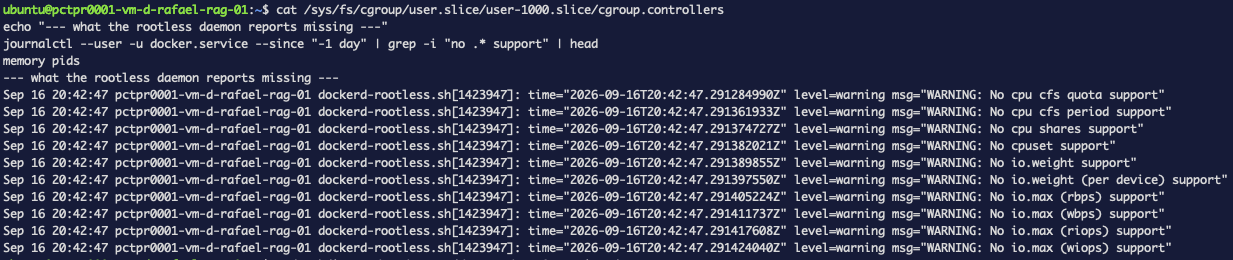
WARNING: No cpu cfs quota support
WARNING: No cpu cfs period support
WARNING: No cpu shares support
WARNING: No cpuset support
WARNING: No io.weight support
WARNING: No io.max (rbps) support
...
This also explains something Part 8 reported as a plain limitation of rootless mode: disk throughput limits not working. Same cause. Not a property of rootless — a property of what systemd delegated.
Where this is documented
Not in Docker's rootless documentation. I searched the page: zero occurrences of "delegate". The guidance lives upstream, on the rootless containers site, which states it directly:
By default, a non-root user can only get memory controller and pids controller to be delegated.
The fix
One drop-in file telling systemd to hand over more:
sudo mkdir -p /etc/systemd/system/user@.service.d
cat <<EOF | sudo tee /etc/systemd/system/user@.service.d/delegate.conf
[Service]
Delegate=cpu cpuset io memory pids
EOF
sudo systemctl daemon-reload
The same page warns:
After changing the systemd configuration, you need to re-login or reboot the host. Rebooting the host is recommended.
On systemd 249 that turned out not to be needed. After daemon-reload alone:
cat /sys/fs/cgroup/user.slice/user-1000.slice/cgroup.controllers
cpuset cpu io memory pids
The daemon still needs restarting, because it reads its capabilities once at startup. Restart only the rootless daemon — not your whole user session, which on this host would also have taken down an unrelated service:
systemctl --user restart docker.service
journalctl --user -u docker.service --since "-1min" | grep -ci "no cpu\|no io"
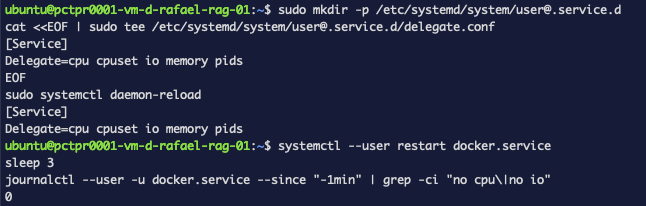
0
Zero warnings, where there were ten.
The same eight loops, again
Identical command to before. One flag added:
docker -c rootless run -d --name burn2 \
  --network none --memory 256m --pids-limit 64 --cpus 0.5 \
  --read-only --tmpfs /tmp:size=16m \
  --cap-drop=ALL --security-opt no-new-privileges \
  python:3.12-alpine sh -c 'for i in $(seq 8); do (while :; do :; done) & done; sleep 8'
sleep 3
docker -c rootless stats --no-stream burn2
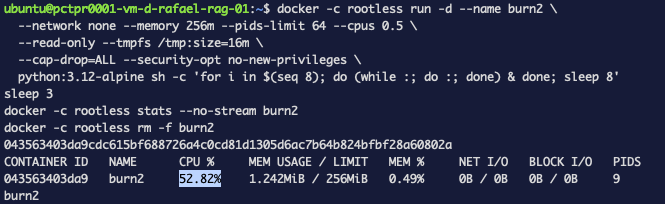
NAME    CPU %    MEM USAGE / LIMIT    NET I/O   PIDS
burn2   52.82%   1.242MiB / 256MiB    0B / 0B   9
605.19% → 52.82%. Same eight infinite loops, same image, same everything. Half a core, as asked.
What you should take from this
A container is not a sandbox until you say what it may use. The default is generous in every dimension that matters, and nothing warns you, because an unrestricted container is a completely normal thing to run.
Check your limits are applied, rather than assuming. The whole of this post exists because a
flag that was silently unavailable looked identical to a flag that was working. docker stats
under a deliberate load takes a minute and tells you the truth.
Error messages point at the wrong layer. "your kernel does not support CPU CFS scheduler" described a kernel that supports it fine. The real cause was a systemd default, two layers away, documented on a different website.
And the honest limit: this sandbox contains resources. It does not make the code safe. It cannot tell a useful script from a hostile one, and a program that does something harmful within 256 MB, half a core and no network will run exactly as written. Containment buys you a blast radius, not a judgement.