The key that expires: giving an agent its own identity at the gateway
 +
+
- 1Lock down Docker networks
- 2Run containers as non-root
- 3Identity in front of every port
- 4Membership, not just an account
- 5An identity for the agent, not a key
- 6A tool server that checks who is asking
- 7Where the agent can go, not just what it can call
- 8Move the daemon off root
- 9Run the model's own code without trusting it
- 🏆A scope per tool, and a refusal clients can act on
Part 4 put group access control on the gateway's admin UI and then, at the end, called the API from a shell with no account, no session and no group. It answered normally. The conclusion was that SSO protects a control plane and the data plane authenticates machine callers with keys — which it has to, because an agent running at 3am cannot complete a browser login.
That was true and it was also a stopping point rather than an answer. "Machine callers use keys" leaves you with a credential that never expires, that no identity provider knows about, and that survives the person who created it. Part 4 said so plainly: removing someone from a group does not revoke their keys, a leaked key is unaffected by identity entirely, and keys outlive people.
This part gives the machine an identity instead of a key.
authentik issues the agent a token over the client credentials grant — no browser, no consent screen, no human. The token is signed, carries a scope, and expires in five minutes. The gateway verifies it locally against authentik's public keys and refuses anything without the right scope. At the end, three status codes show the boundary holding.
One WEC Instance: 8 vCPU AMD EPYC 7601, 15 GB RAM, Docker 29.1.3, kernel 5.15. authentik
2026.8.1, the same instance from Parts 3 and 4 on host port 9100. LiteLLM 1.96.2 from
Part 1 of the gateway series, bound to
127.0.0.1:4000, models served over WEC Inference. Verification uses PyJWT 2.13.0 and
cryptography 50.0.0, both already present in the LiteLLM image.
Plain HTTP on a private LAN, as in Parts 3 and 4. Substitute your own addresses.
Two grants, two different questions
Parts 3 and 4 used the authorization code grant throughout. A person clicks a button, gets redirected to authentik, types a password, sees a consent screen, and is redirected back with a code the application exchanges for a token. Every step of that assumes a browser and a human attached to it.
The client credentials grant answers a different question. There is no user. The client is the principal, and it proves that with an ID and a secret, in one request, with no redirect anywhere.
The property worth noticing: the gateway never asks authentik whether a token is good. It fetches authentik's public keys once, caches them, and checks the signature itself. Identity scales without the identity provider becoming a bottleneck — or a single point of failure on every request.
Prerequisites
- A working authentik, ideally the one from Part 3
- A running LiteLLM gateway from Part 1 of the gateway series
- Its
LITELLM_MASTER_KEY, and shell access to the box
Step 1 — A client with exactly one grant
Applications → Providers → New Provider → OAuth2/OpenID Provider → Next.
- Provider Name —
agent-gateway - Authorization Flow — leave
default-provider-authorization-explicit-consent. It is required, and it is inert here: it governs the consent screen a human sees, and no human will ever use this client. You have to pick one anyway. - Client Type — Confidential. authentik's own description is the reason: "Confidential clients are capable of maintaining the confidentiality of their credentials such as client secrets." Client credentials has nothing but that secret to prove identity, so a public client cannot use this grant at all.
- Redirect URIs — leave empty. Nothing is ever redirected anywhere.
Then scroll to Grant Types, and look at what a new provider ships with.
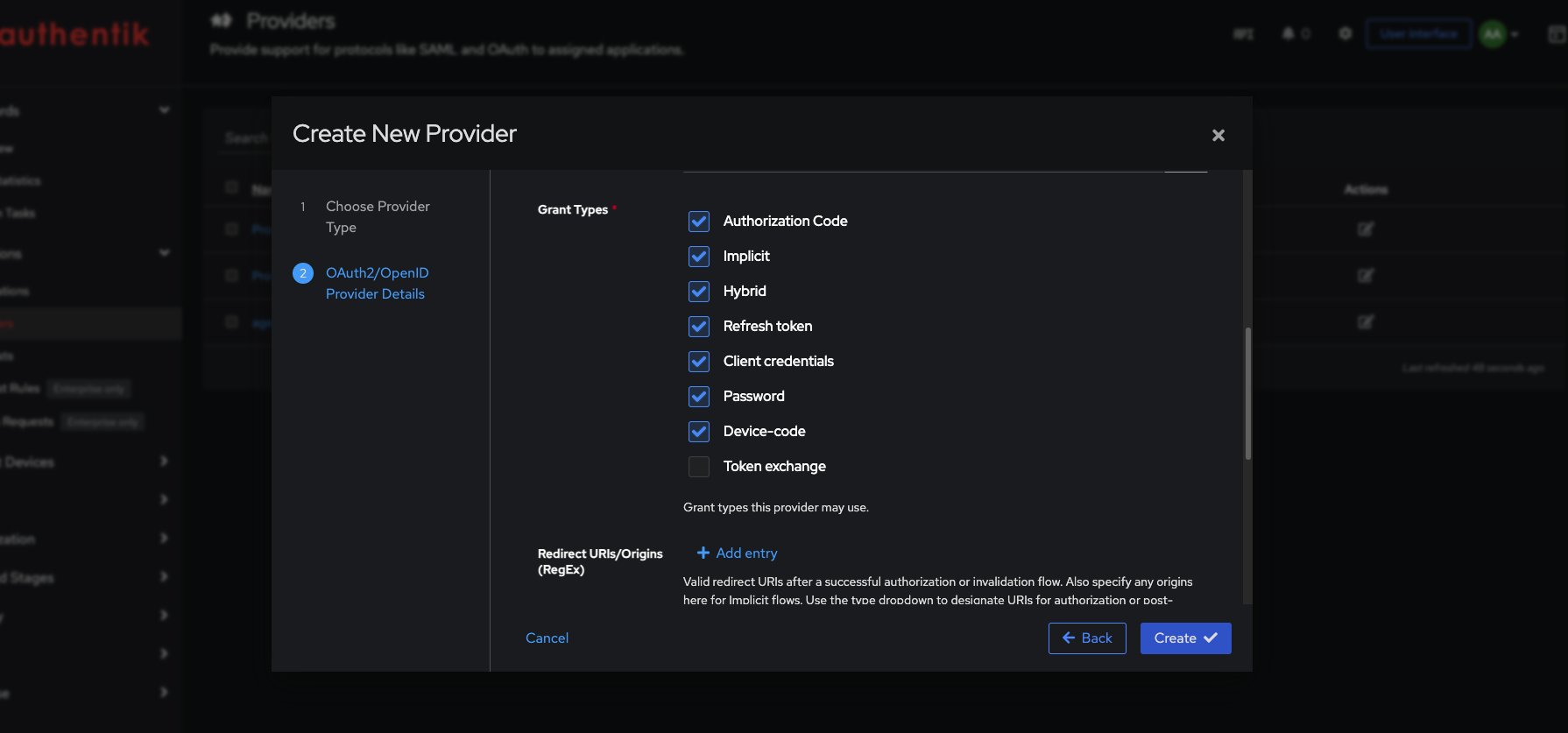
Seven of eight, enabled by default. Two of them — Implicit and Password — did not make it into OAuth 2.1, which states plainly that "some features available in OAuth 2.0, such as the Implicit or Resource Owner Credentials grant types, are not specified in OAuth 2.1" (§10.1). Password in particular has the client handle a user's actual password, which is why it fell out of favour. Nothing asked whether you wanted them and nothing warns you that they are on.
Uncheck everything except Client credentials.
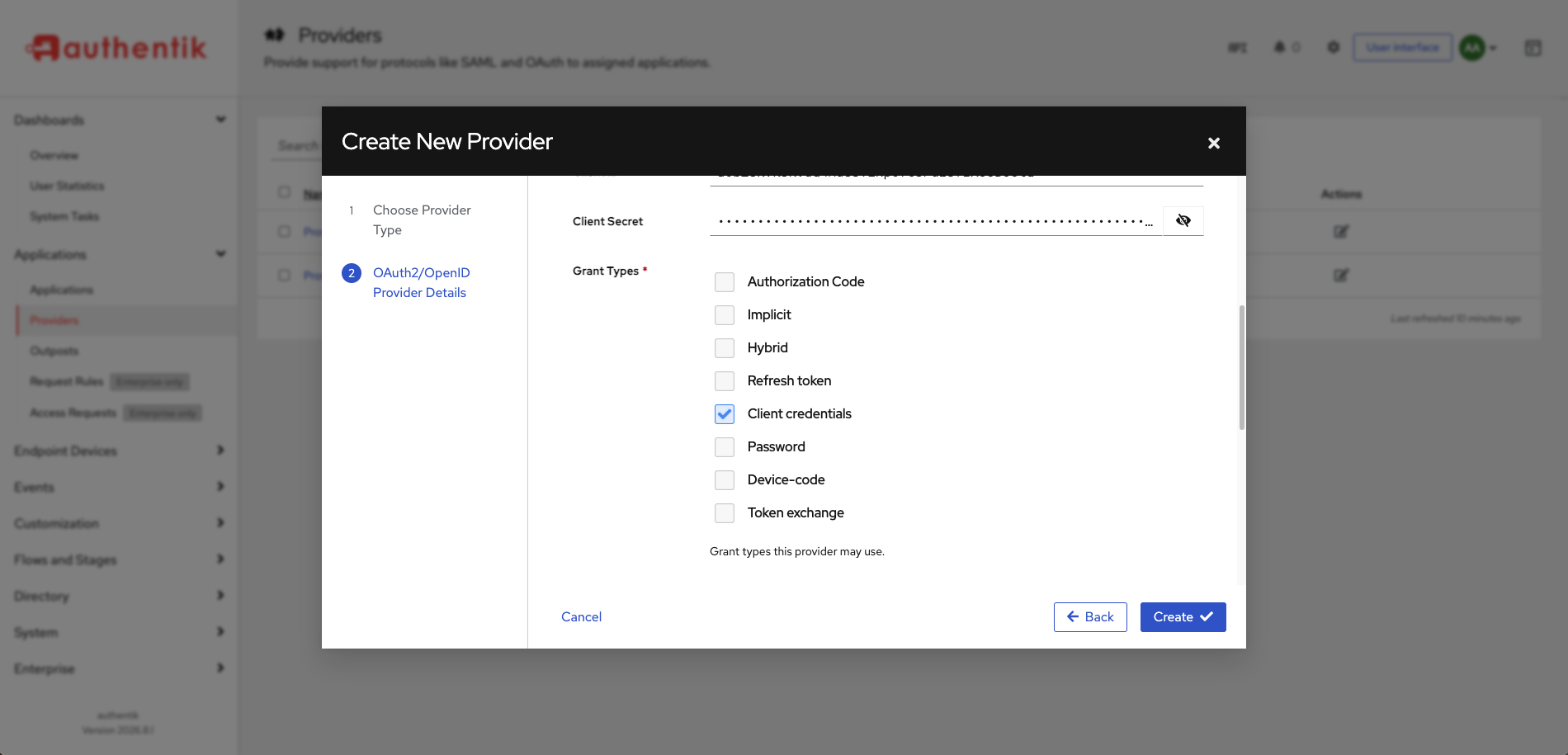
This is the same least-privilege reflex Part 4 applied to group membership, one layer down. A client that only ever uses one grant should only be permitted one grant, so that a misconfiguration elsewhere cannot turn it into a password-accepting endpoint.
Those defaults applied to every provider you created in Parts 3 and 4 too, and nothing has trimmed them since. Ask the database rather than the UI:
cd ~/authentik && docker compose exec server ak shell -c "
from authentik.providers.oauth2.models import OAuth2Provider
for p in OAuth2Provider.objects.all():
    print(f'{p.name}: {p.grant_types}')" 2>/dev/null | tail -5
Provider for Langfuse: ['authorization_code', 'implicit', 'urn:ietf:params:oauth:grant-type:device_code']
Provider for LiteLLM: ['authorization_code', 'implicit', 'hybrid', 'refresh_token', 'client_credentials', 'password', 'urn:ietf:params:oauth:grant-type:device_code']
agent-gateway: ['client_credentials']
The gateway's provider is still holding password and client_credentials
alongside the grant it actually uses. Neither was needed, and the password grant in particular
is a live way in that nobody put there on purpose. Trim each provider to the grants it uses.
Read authentik's own help text on the Redirect URIs field: "If no explicit authorization redirect URIs are specified, the first successfully used authorization redirect URI will be saved."
Empty does not mean "deny all". It means trust-on-first-use — authentik pins whichever
redirect URI shows up first and keeps it. That is harmless for a client which never redirects,
which is our case. It is not harmless on an interactive provider, where it means you have no
redirect validation at all until someone logs in and pins one for you. Part 3 warned against
setting the mode to .*; this is the quieter version of the same hazard.
Step 2 — The application it belongs to
Read back the credentials and try to get a token. It will not work yet, and the reason is the most useful thing in this post.
mkdir -p ~/agent-auth
cd ~/agent-auth
umask 077
cat > .env <<EOF
AK_TOKEN_URL=http://10.80.4.212:9100/application/o/token/
AK_CLIENT_ID=<client id from the provider page>
AK_CLIENT_SECRET=<client secret from the provider page>
EOF
umask 077 creates the file with 600 permissions rather than chmod-ing it afterwards, so there
is no window where the secret is world-readable.
A small helper, because you will fetch tokens constantly:
cat > ~/agent-auth/token.sh <<'EOF'
#!/usr/bin/env bash
set -euo pipefail
source "$(dirname "$0")/.env"

curl -sS -X POST "$AK_TOKEN_URL" \
  -d grant_type=client_credentials \
  -d client_id="$AK_CLIENT_ID" \
  -d client_secret="$AK_CLIENT_SECRET" \
  -d scope="${1:-}" \
  | jq -r .access_token
EOF
chmod +x ~/agent-auth/token.sh
Ask for a token:
cd ~/agent-auth
source .env
curl -sS -X POST "$AK_TOKEN_URL" \
  -d grant_type=client_credentials \
  -d client_id="$AK_CLIENT_ID" \
  -d client_secret="$AK_CLIENT_SECRET" | jq
{
  "error": "invalid_grant",
  "error_description": "The provided authorization grant or refresh token is invalid, expired, revoked, does not match the redirection URI used in the authorization request, or was issued to another client",
  "request_id": "757c397b97a745259e288b6d4ff1553c"
}
Every clause in that description is wrong for our situation. Nothing is expired, nothing is revoked, no redirection URI was used, and the client is the one the credentials belong to. The server log records the 400 and no reason. authentik's Events show nothing useful either.
The actual cause is visible in the Providers list, which flags it plainly:
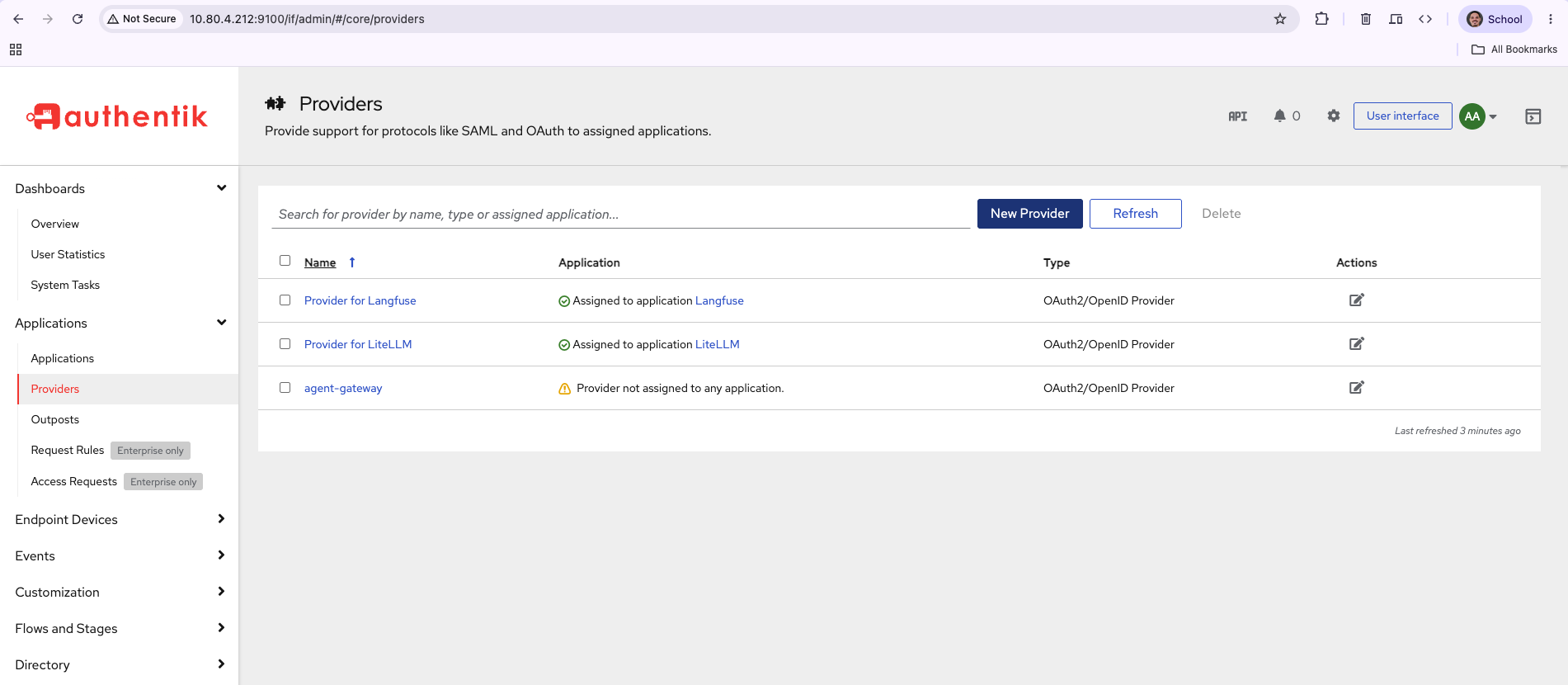
A provider with no application cannot issue a token. authentik authorizes against the
application, so a provider on its own has nothing to authorize against — and says
invalid_grant instead of saying that.
This is not in authentik's client credentials documentation, which documents five ways to authenticate — three static-credential variants and two JWT ones — and says nothing about needing an application.
Pair one. Note the route: the New Application wizard always creates a new provider, so it cannot adopt the one we just built.
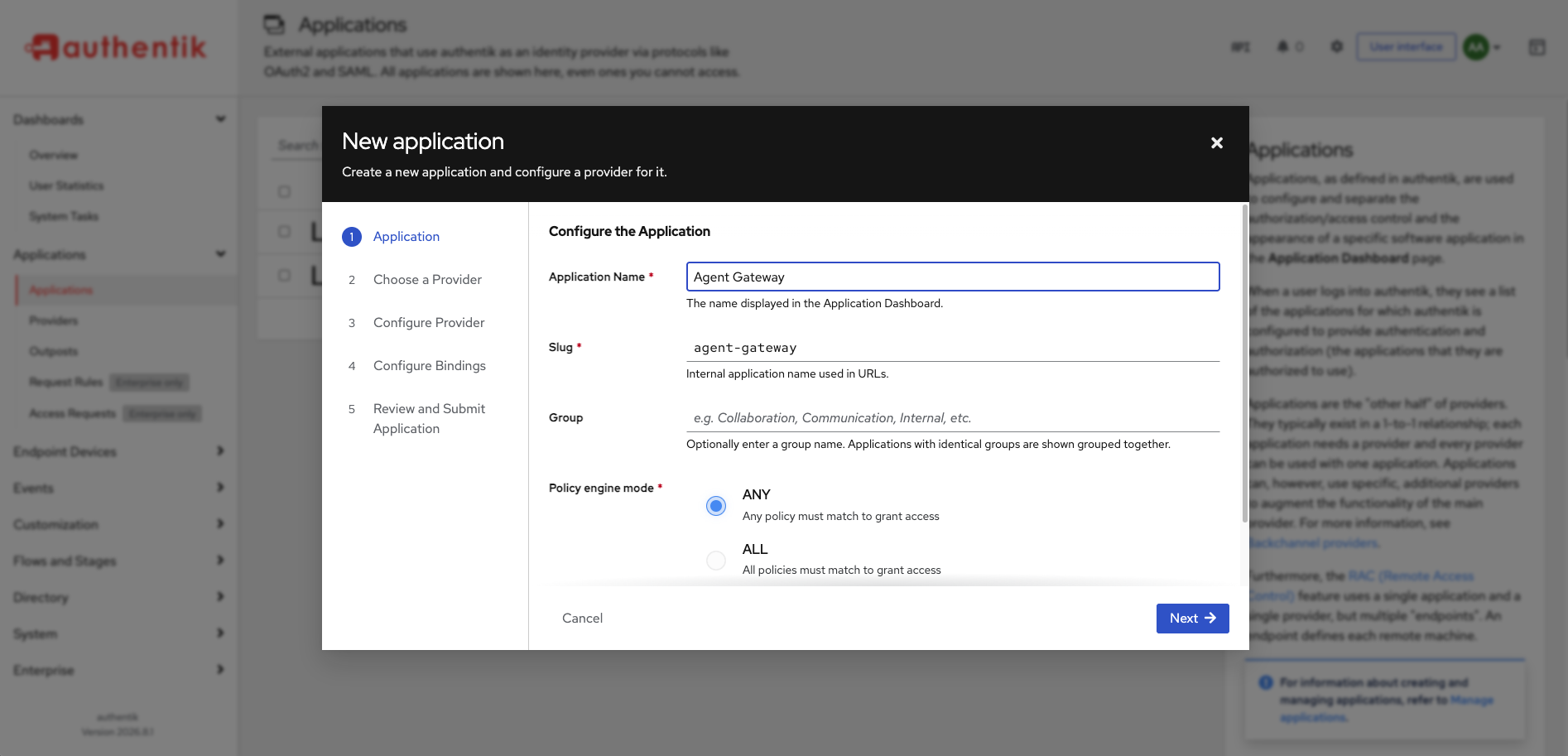
Its step list gives it away — Choose a Provider is step 2, and every option there builds a new one. The caret beside the button is where the other path lives.
Applications → Applications → New Application ▾ → with Existing Provider…
- Name —
Agent Gateway - Slug —
agent-gateway, typed explicitly. Part 4's finding was that authentik derives slugs from names and turnedLiteLLMintolite-llm; the slug lands in the issuer URL, so it is worth setting by hand every time. - Provider —
agent-gateway - Hidden from Application Dashboard — check it. No person should ever see a tile for a machine client.
Retry the token request and it succeeds. Nothing changed except the pairing.
Step 3 — A scope that means something
The token you now get carries "scope": "". It proves who the caller is and grants no
authority at all. A gateway receiving it knows the client is agent-gateway and nothing more.
Customization → Property Mappings → New Property Mapping → Scope Mapping.
- Mapping Name —
gateway-invoke, authentik's label for the object - Scope name —
gateway:invoke, the string clients request and that appears in the token - Expression —
return {}
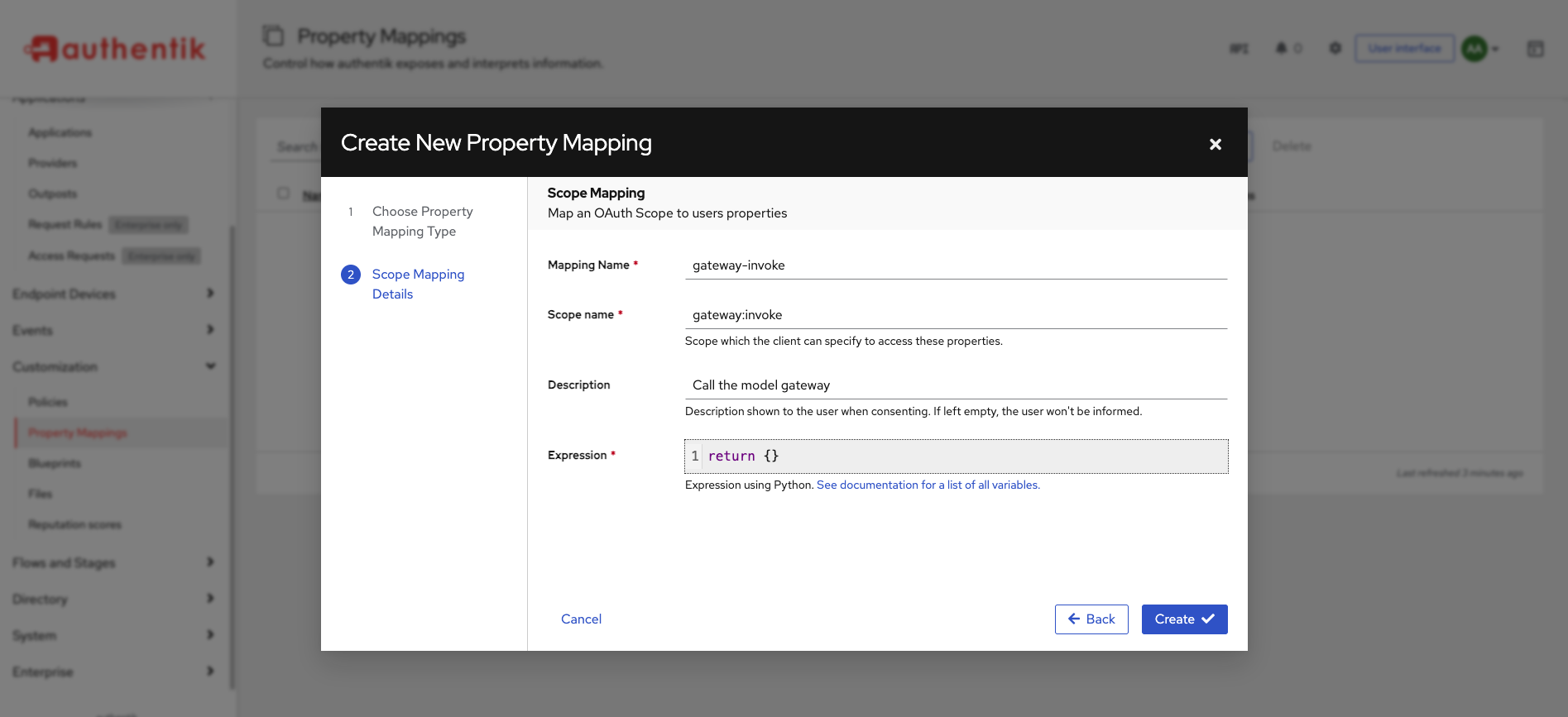
The two name fields are different things and the form does not make that obvious. The expression is Python whose return value is merged into the token's claims; an empty dict is right here, because we want the scope named in the token, not extra data carried inside it.
Attach it: Applications → Providers → agent-gateway → Edit → Advanced protocol settings →
Scopes, and move gateway-invoke from Available to Selected.
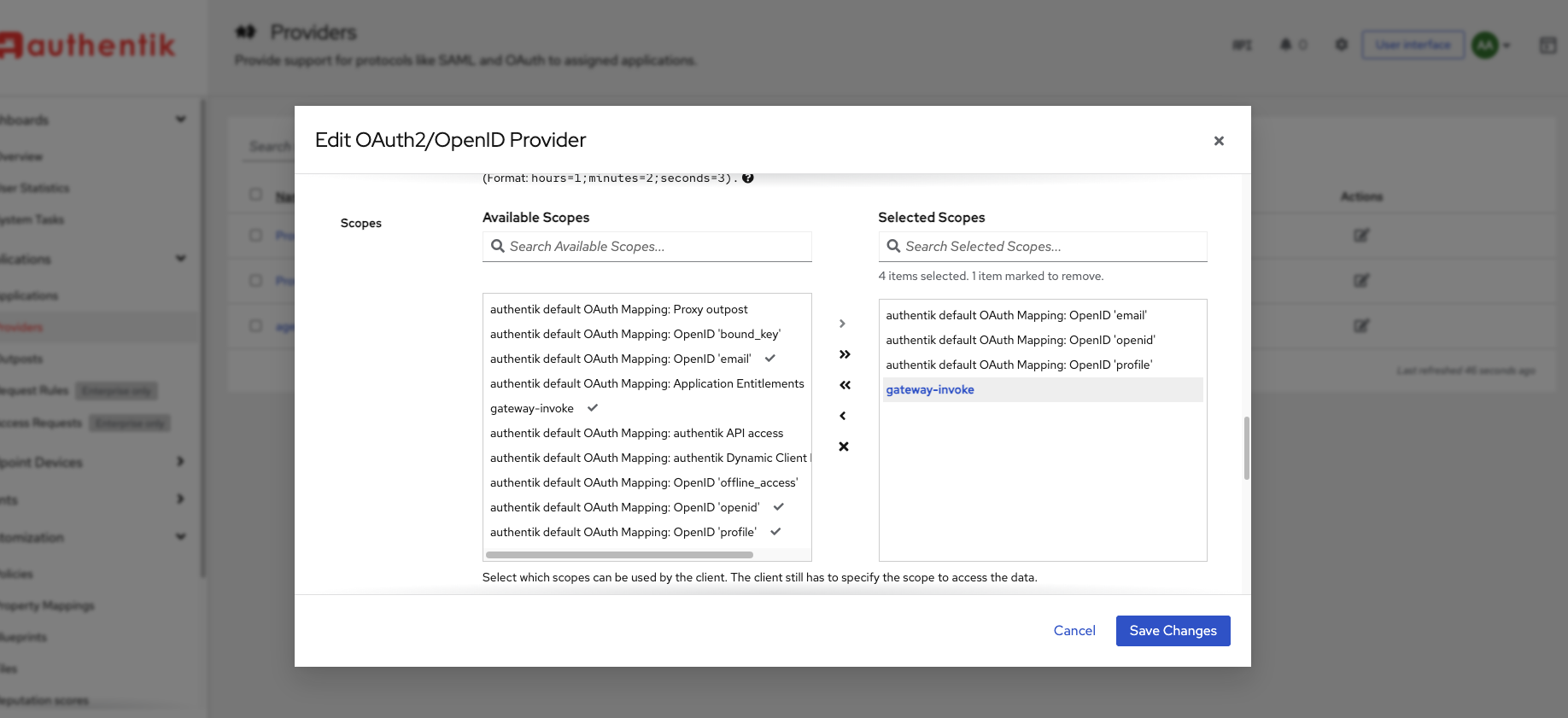
Read the help text under that pane, because it is the whole mechanic:
"Select which scopes can be used by the client. The client still has to specify the scope to access the data."
Attaching a scope makes it available. The client still has to ask. That is why the first token came back empty even though three scopes were already attached — nothing had requested them.
The dual-list marks entries for deletion when you click them in the right-hand column, and the only indication is a line of small text above it reading "4 items selected. 1 item marked to remove." Saving at that moment silently unlinks the scope you just added. Read that line before you save.
Now ask for it:
TOKEN=$(~/agent-auth/token.sh gateway:invoke)
jq -R 'split(".")[1] | gsub("-";"+") | gsub("_";"/") | @base64d | fromjson' <<< "$TOKEN"
{
  "iss": "http://10.80.4.212:9100/application/o/agent-gateway/",
  "sub": "2451c6a1bab3085590263f119e650448beb013336146bcfee8241dd5832c200b",
  "aud": "aObZ8KvKsKVdQ4MuSsTINp0f65Puz5fzXUUBC6iQ",
  "exp": 1788901322,
  "iat": 1788901022,
  "acr": "goauthentik.io/providers/oauth2/default",
  "jti": "NRDTukijwLJbW7gpPtn9zUZwzTj6d2kBSZCuFYvX",
  "azp": "aObZ8KvKsKVdQ4MuSsTINp0f65Puz5fzXUUBC6iQ",
  "uid": "neugHWoWQOQzADgbV1vKwzew2COQ1RgCXfyywgqa",
  "scope": "gateway:invoke"
}
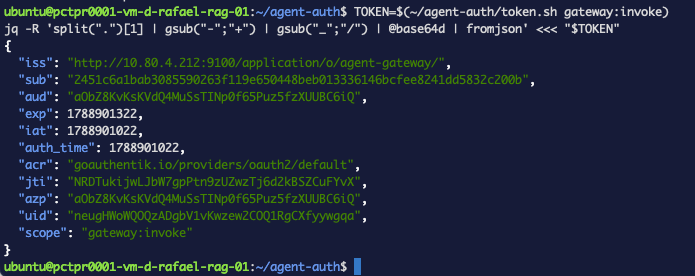
exp minus iat is 300 seconds. That is the entire argument for this over a static key: a
token pasted into a chat window, a log file or a screenshot is worthless five minutes later.
There is no email or preferred_username in there, because there is no user. sub is a
service account authentik created for you, named ak-agent-gateway-client_credentials — it
appears in Directory → Users without ever being asked for.
Step 4 — Teaching the gateway to verify
LiteLLM documents JWT authentication with a litellm_jwtauth block, enforce_scope_based_access
and scope_mappings. Configure it on a stock install and nothing happens, because the same page
says:
"JWT-based Auth requires a LiteLLM Enterprise license."
Check before you write config:
docker exec llm-gateway python -c "
from litellm.proxy.proxy_server import premium_user
print('premium_user =', premium_user)"
premium_user = False
False means that whole documented path is closed to you. The open-source alternative is
custom_auth, which hands every request to a function you write — and for this job it is about
twenty-five lines.
Once custom_auth is set, every request goes through your function, including the sk-
virtual keys from the rest of the gateway series and the master key itself. A handler that only
understands JWTs locks you out of your own gateway. The handler below falls back to the master
key deliberately.
Back up before you start: cp config.yaml config.yaml.bak
import os

import jwt
from fastapi import Request
from litellm.proxy._types import UserAPIKeyAuth

JWKS_URL = os.environ["JWT_PUBLIC_KEY_URL"]
ISSUER = os.environ["JWT_ISSUER"]
AUDIENCE = os.environ["JWT_AUDIENCE"]
REQUIRED_SCOPE = "gateway:invoke"
MASTER_KEY = os.environ["LITELLM_MASTER_KEY"]

_jwks = jwt.PyJWKClient(JWKS_URL)


async def user_api_key_auth(request: Request, api_key: str) -> UserAPIKeyAuth:
    token = api_key.removeprefix("Bearer ").strip()

    # Not a JWT: fall back to the master key so existing tooling keeps working.
    if token.count(".") != 2:
        if token == MASTER_KEY:
            return UserAPIKeyAuth(api_key=token)
        raise Exception("not a JWT and not the master key")

    signing_key = _jwks.get_signing_key_from_jwt(token)
    claims = jwt.decode(
        token,
        signing_key.key,
        algorithms=["RS256"],
        issuer=ISSUER,
        audience=AUDIENCE,
    )

    if REQUIRED_SCOPE not in claims.get("scope", "").split():
        raise Exception(f"token is missing scope {REQUIRED_SCOPE}")

    return UserAPIKeyAuth(api_key=token, user_id=claims["sub"])
PyJWKClient does the part that looks hard. It fetches the JWKS, matches the token's kid
header to the right key, and caches it — so after the first request, verification is local
arithmetic. jwt.decode checks the signature, the issuer, the audience and the expiry in one
call, and raises if any of them is wrong.
Three environment variables, appended to ~/llm-gateway/.env:
JWT_PUBLIC_KEY_URL=http://10.80.4.212:9100/application/o/agent-gateway/jwks/
JWT_ISSUER=http://10.80.4.212:9100/application/o/agent-gateway/
JWT_AUDIENCE=aObZ8KvKsKVdQ4MuSsTINp0f65Puz5fzXUUBC6iQ
JWT_ISSUER and JWT_AUDIENCE must match the iss and aud you saw in the decoded token
exactly, or every token is refused.
Mount the module the same way the gateway already mounts scrubber.py, in
docker-compose.yml:
- ./jwt_auth.py:/app/jwt_auth.py:ro
And in config.yaml, under general_settings:
  custom_auth: jwt_auth.user_api_key_auth
  custom_auth_run_common_checks: true
That second line matters more than it looks. Without it, LiteLLM warns at startup:
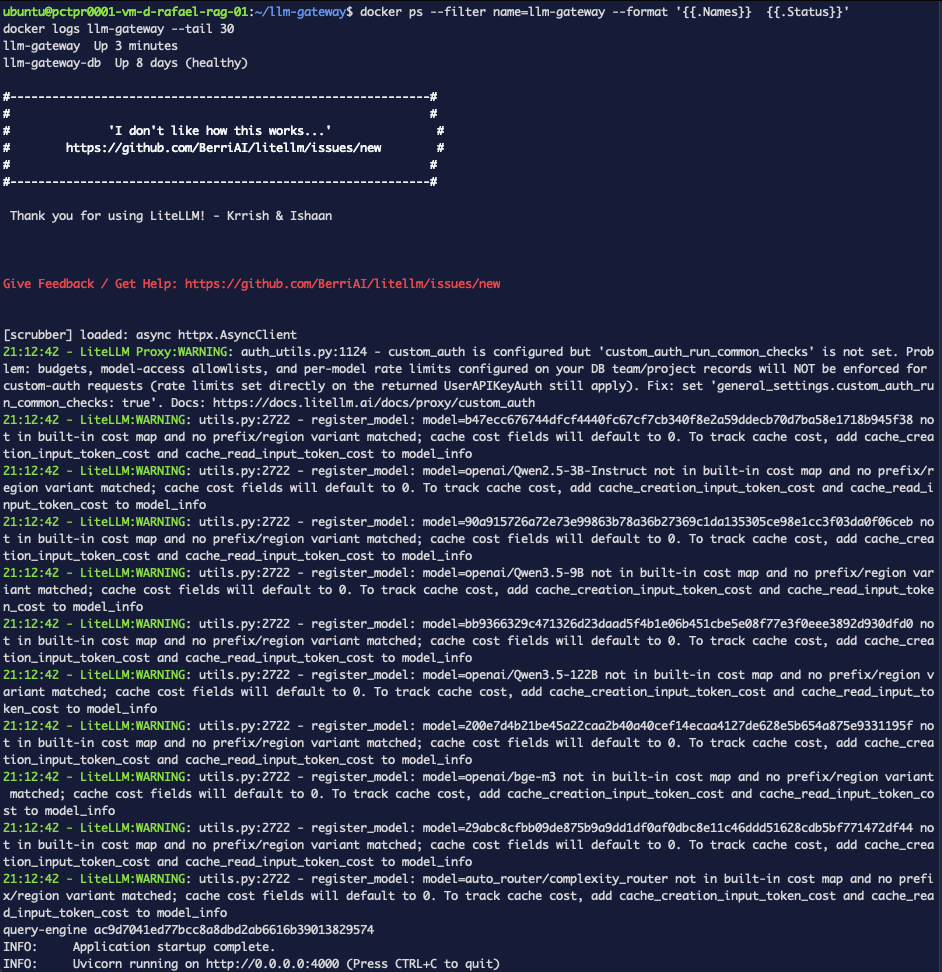
"custom_auth is configured but 'custom_auth_run_common_checks' is not set. Problem: budgets, model-access allowlists, and per-model rate limits configured on your DB team/project records will NOT be enforced for custom-auth requests."
Read that carefully. Adding token authentication would, by default, have exempted every token holder from the controls you already configured. You would have made the gateway more secure in one dimension and quietly weaker in another, and the only notice is one warning line at startup.
config.yaml is a bind mount. Changing its contents changes no part of the compose spec, so
docker compose up -d reports Container llm-gateway Running and does nothing. Your tests
then run against the old process and reproduce the old results exactly, which reads like your
change had no effect.
Use docker restart llm-gateway, and confirm by the warning above disappearing from the log.
Step 5 — The boundary, in three status codes
TOKEN=$(~/agent-auth/token.sh gateway:invoke)
NOSCOPE=$(~/agent-auth/token.sh)

curl -sS -o /dev/null -w 'no token      HTTP %{http_code}\n' http://127.0.0.1:4000/v1/chat/completions \
  -H 'Content-Type: application/json' \
  -d '{"model":"qwen-mid","messages":[{"role":"user","content":"Say OK."}]}'

curl -sS -o /dev/null -w 'wrong scope   HTTP %{http_code}\n' http://127.0.0.1:4000/v1/chat/completions \
  -H "Authorization: Bearer $NOSCOPE" -H 'Content-Type: application/json' \
  -d '{"model":"qwen-mid","messages":[{"role":"user","content":"Say OK."}]}'

curl -sS -o /dev/null -w 'valid token   HTTP %{http_code}\n' http://127.0.0.1:4000/v1/chat/completions \
  -H "Authorization: Bearer $TOKEN" -H 'Content-Type: application/json' \
  -d '{"model":"qwen-mid","messages":[{"role":"user","content":"Say OK."}]}'
no token      HTTP 401
wrong scope   HTTP 401
valid token   HTTP 429
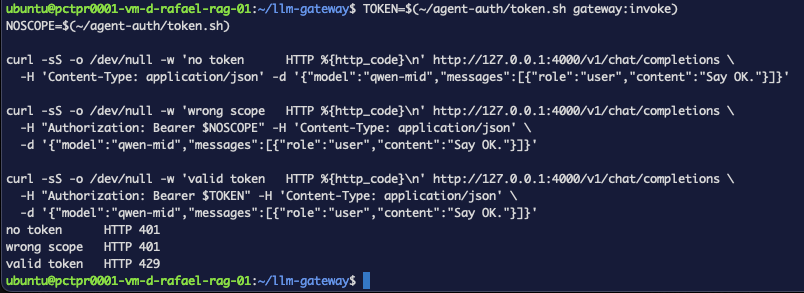
The first two never reach a model. The second is the one that matters: a valid, correctly
signed, unexpired token from the right issuer, refused because it did not carry
gateway:invoke. Identity alone is not authority.
The third is the interesting one, and it is not a 200. It cleared authentication and scope, and was then answered by a completely different part of the gateway — the budget and routing layer the gateway series configures, which on this box had a cap already reached. That is the point of the shape rather than a flaw in it: a 401 means we do not know who you are, or you may not do this, and anything else means the request got past identity entirely and is now somebody else's decision. Authentication's job ends at the first two lines.
Confirm the refusal came from your check rather than something incidental:
docker logs llm-gateway --since 10m 2>&1 | grep -iE 'missing scope|401 Unauthorized' | tail -5
user_api_key_auth(): Exception occured - token is missing scope gateway:invoke
Exception: token is missing scope gateway:invoke
INFO:     "POST /v1/chat/completions HTTP/1.1" 401 Unauthorized

Note where that reason lives. The caller receives a bare 401 with no explanation, which is correct — telling a client "your token is valid but lacks scope X" tells an attacker exactly what to go and get. It does mean that debugging this always means reading the gateway log, and never the response body.
You can give a headless agent its own identity: a confidential client restricted to one grant, a scope that means something, and a gateway that verifies the signature locally and refuses anything without the scope — with the refusal proven from the log rather than assumed from a status code.
Troubleshooting — the errors this run actually produced
invalid_client
The credentials did not authenticate at all. Before blaming authentik, check what actually
landed in your .env:
awk -F= '{printf "%-18s %3d chars\n", $1, length($2)}' ~/agent-auth/.env
AK_TOKEN_URL        48 chars
AK_CLIENT_ID        40 chars
AK_CLIENT_SECRET   128 chars
The client ID is 40 characters and the secret is 128. A zero-length value means the file is the problem, not the provider.
invalid_grant, with everything apparently correct
The provider is not paired to an application. See Step 2 — the Providers list flags it, the error text does not.
AK_TOKEN_URL: unbound variable, and a corrupted secret
echo 'X=1' >> .env on a file whose last line has no trailing newline appends to that line
instead of creating a new one:
AK_CLIENT_SECRET=p94oDU...dgJcAK_TOKEN_URL=http://10.80.4.212:9100/application/o/token/
Two variables destroyed in one command, silently — the secret is now wrong and the new
variable does not exist. Check with cat -A, which marks line ends with $, and prefer
writing the whole file with a single heredoc over appending to it.
The config change had no effect
The container was never restarted. See the warning in Step 4.
401 with no reason in the response
By design. The reason is in docker logs llm-gateway.
What this did and didn't buy you
Done: a machine identity issued by your identity provider rather than minted by hand, a credential that expires in five minutes, a scope that has to be requested and is checked on every call, revocation that happens in one place, and a caller the gateway can name in its logs as something other than a key prefix.
Not done:
- The MCP server is still open. Everything here protects the gateway. The tools server from
agent orchestration Part 4 still trusts anything that
can reach its port,
issue_refundincluded. Same problem, one layer up, and the subject of the next part. - One scope, one client. A real deployment has several agents with different scopes, and
scope_mappingsbetween scopes and models is where that goes. - The master key still works, deliberately, as the fallback in the handler. It remains the break-glass credential Part 4 described, and it still bypasses everything.
- Still plain HTTP. The token crosses the network in the clear, and a token in the clear is a key in the clear until it expires.
- The service account is invisible. authentik created
ak-agent-gateway-client_credentialswithout asking, and nothing in the token says it is a machine rather than a person.
What's next
The MCP server. FastMCP ships a JWTVerifier that takes a jwks_uri, an issuer, an
audience and required_scopes — the same four things configured here — so the tools server
can demand a scoped token before it will list a tool, let alone run one. That closes the gap
agent orchestration Part 4 left open, where scoping happened in the client and the server
trusted whoever reached the port.