The wrong valid token: authenticating an MCP tools server with authentik

 +
+
- 1Lock down Docker networks
- 2Run containers as non-root
- 3Identity in front of every port
- 4Membership, not just an account
- 5An identity for the agent, not a key
- 6A tool server that checks who is asking
- 7Where the agent can go, not just what it can call
- 8Move the daemon off root
- 9Run the model's own code without trusting it
- 🏆A scope per tool, and a refusal clients can act on
Part 5 gave an agent its own identity at
the gateway: a token issued by authentik over client credentials, carrying a scope, expiring in
five minutes. It ended by naming what it had not covered — the MCP tools server from
agent orchestration part 4 still trusts anything that
can reach its port, issue_refund included.
That post was explicit about the limit of what it had built:
The MCP server still trusts everyone. Scoping happens in the client. Anything that can reach
127.0.0.1:8770can callissue_refunddirectly, agent or not.
Splitting the toolbox per role stopped an agent from reaching a tool it shouldn't. It did
nothing about a curl. This part closes that.
The same box as Parts 3 through 5: one WEC Instance, 8 vCPU AMD EPYC 7601, 15 GB RAM, Ubuntu
22.04, Python 3.10. authentik 2026.8.1 on host port 9100. fastmcp 4.0.2, mcp 2.1.1,
langchain 1.4.0. The MCP server is office_tools.py from
agent orchestration part 3, unchanged except
for the lines shown here, still on 127.0.0.1:8770.
Plain HTTP on a private LAN, as throughout this series.
One client or two
The obvious move is to reuse Part 5's agent-gateway client and add a second scope to it. It
already exists, the agent already holds its credentials, and it would work.
Don't. If one credential opens both the gateway and the tools server, then a leaked gateway key also issues refunds, and the blast radius of losing it doubles. The whole thread running through Part 4's groups and Part 5's grant types is that a credential should do one job.
So the tools server gets its own client, its own scope, and — because in authentik every provider is its own issuer — its own issuer. That last part turns out to matter more than expected, and we get to it in Step 4.
Prerequisites
- The authentik from Part 3, with the
agent-gatewayclient from Part 5 - The MCP server and virtualenv from agent orchestration part 3
fastmcp4.0.0 or newer — the client-credentials helper discussed in Step 5 does not exist before it
Step 1 — A second client, in three parts
This is Part 5's procedure with different names, so it is deliberately terse here. If any of it is unfamiliar, Part 5 walks through the same three screens with figures.
The provider. Applications → Providers → New Provider → OAuth2/OpenID → Next. Name
agent-tools, Client Type Confidential, Redirect URIs empty, and in Grant Types uncheck
everything except Client credentials.
The scope. Customization → Property Mappings → New Property Mapping → Scope Mapping. Mapping
Name mcp-invoke, Scope name mcp:invoke, expression return {}. The two name fields are
different things: the first is authentik's label, the second is the string that lands in the
token.
The application. Applications → Applications → New Application ▾ → with Existing
Provider…, named Agent Tools, slug agent-tools typed by hand, provider agent-tools,
hidden from the dashboard. Then Edit the provider → Advanced protocol settings → Scopes, and
move mcp-invoke into Selected.
Verify the grant types from the database rather than the form, which is Part 4's lesson:
cd ~/authentik && docker compose exec server ak shell -c "
from authentik.providers.oauth2.models import OAuth2Provider
for p in OAuth2Provider.objects.all():
    print(f'{p.name}: {p.grant_types}')" 2>/dev/null | tail -5
Provider for Langfuse: ['authorization_code', 'implicit', 'urn:ietf:params:oauth:grant-type:device_code']
Provider for LiteLLM: ['authorization_code', 'implicit', 'hybrid', 'refresh_token', 'client_credentials', 'password', 'urn:ietf:params:oauth:grant-type:device_code']
agent-gateway: ['client_credentials']
agent-tools: ['client_credentials']
Two clients trimmed to one grant each, and — visible in the same output — the LiteLLM provider
from Part 4 still carrying password and five others nobody chose. Part 5 said to go back and
fix those. This is what not doing it looks like.
Step 2 — A token, and why it is a different token
Read the credentials out and keep them beside the gateway's, in their own directory:
cd ~/authentik
read -r TID TSEC < <(docker compose exec -T server ak shell -c "
from authentik.providers.oauth2.models import OAuth2Provider as P
p = P.objects.get(name='agent-tools')
print(p.client_id, p.client_secret)" 2>/dev/null | tail -1)

mkdir -p ~/mcp-auth && cd ~/mcp-auth
umask 077
cat > .env <<EOF
AK_TOKEN_URL=http://10.80.4.212:9100/application/o/token/
AK_CLIENT_ID=$TID
AK_CLIENT_SECRET=$TSEC
EOF
cp ~/agent-auth/token.sh ~/mcp-auth/token.sh
The helper is Part 5's, unchanged — it takes a scope and returns an access token.
~/mcp-auth/token.sh mcp:invoke | jq -R 'split(".")[1] | gsub("-";"+") | gsub("_";"/") | @base64d | fromjson'
{
  "iss": "http://10.80.4.212:9100/application/o/agent-tools/",
  "sub": "545a532b77a0f877339a5e4312970069deeb9ded604494c510debdfdce9c970d",
  "aud": "xNxmOEyPMPVThmxgLsyvTCHa3qvnpVjQSOY0bZck",
  "exp": 1789050030,
  "iat": 1789049730,
  "scope": "mcp:invoke"
}
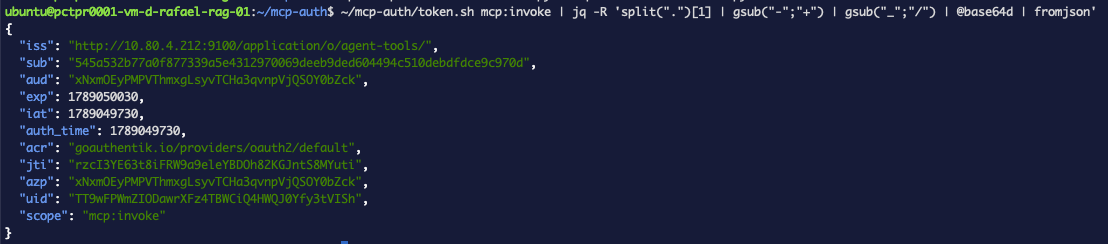
Three fields differ from the gateway's token and all three are load-bearing. The issuer ends
/agent-tools/ rather than /agent-gateway/. The audience is a different client ID. The
scope is mcp:invoke. exp minus iat is 300 seconds, same as Part 5 — remember that
number, it comes back in Step 5.
If the token comes back with "scope": "", the mapping exists but is not attached to the
provider. authentik's own help text on that pane: "Select which scopes can be used by the
client. The client still has to specify the scope to access the data." Attaching makes it
available; the client still has to ask.
Step 3 — The verifier
FastMCP validates JWTs with JWTVerifier, which takes the four things authentik just told us.
Back up the server first, since it is the artefact two published parts are built on:
cp ~/mcp-tools/office_tools.py ~/mcp-tools/office_tools.py.bak
Its configuration goes in a file rather than the source:
cd ~/mcp-tools
umask 077
cat > .env.mcp <<'EOF'
MCP_JWKS_URI=http://10.80.4.212:9100/application/o/agent-tools/jwks/
MCP_ISSUER=http://10.80.4.212:9100/application/o/agent-tools/
MCP_AUDIENCE=<the agent-tools client id>
EOF
Then two changes to office_tools.py — an import, and a verifier where the bare constructor was:
from fastmcp import FastMCP, Context
from fastmcp.server.auth.providers.jwt import JWTVerifier

verifier = JWTVerifier(
    jwks_uri=os.environ["MCP_JWKS_URI"],
    issuer=os.environ["MCP_ISSUER"],
    audience=os.environ["MCP_AUDIENCE"],
    required_scopes=["mcp:invoke"],
)

mcp = FastMCP("office-tools", auth=verifier)
That is the entire server-side change. JWTVerifier fetches the JWKS, matches each token's
kid to a key, and checks signature, issuer, audience, expiry and scope before any tool runs.
ssrf_safe and private addressesJWTVerifier takes an ssrf_safe argument that defaults to False, and enabling it sounds
unambiguously like a good idea. On a setup like this one it breaks the verifier. FastMCP's SSRF
guard rejects on IP, and its own error text is "Private, loopback, link-local, and reserved IPs
are not allowed" — the check explicitly covers 10.x, 172.16-31.x, 192.168.x and 127.x.
Our JWKS is at 10.80.4.212, so the fetch never leaves the process.
If you want the guard on and your identity provider is genuinely internal, the module reads
FASTMCP_SSRF_TRUST_PROXY, which skips DNS resolution and the IP blocklist entirely.
Restart with the new environment loaded:
pkill -f office_tools.py
cd ~/mcp-tools && set -a && source .env.mcp && set +a && \
  nohup ./.venv/bin/python -u office_tools.py > server.log 2>&1 &
sleep 4 && tail -8 server.log
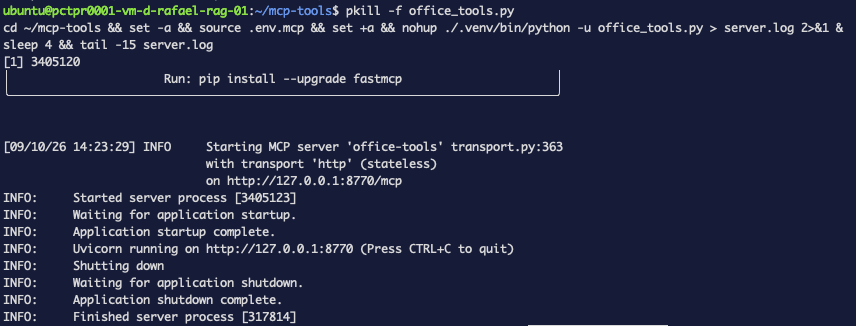
Read that startup log carefully, because of what is missing from it. It reports the transport, the mode and the port, and says nothing whatsoever about authentication. A server with a verifier attached and a server without one log the same lines. There is no "auth enabled" message to look for, so the only way to know the verifier took is to make a request — which is the next step.
Step 4 — Three requests
The same shape as Part 5's three status codes, because it reads well and because the middle one is the interesting one:
TOOLS=$(~/mcp-auth/token.sh mcp:invoke)
GW=$(~/agent-auth/token.sh gateway:invoke)

req() {
  curl -sS -o /dev/null -w "$1  HTTP %{http_code}\n" -X POST http://127.0.0.1:8770/mcp \
    -H 'Content-Type: application/json' \
    -H 'Accept: application/json, text/event-stream' \
    ${2:+-H "Authorization: Bearer $2"} \
    -d '{"jsonrpc":"2.0","id":1,"method":"tools/list"}'
}

req "no token     "
req "gateway token" "$GW"
req "tools token  " "$TOOLS"
no token       HTTP 401
gateway token  HTTP 401
tools token    HTTP 200
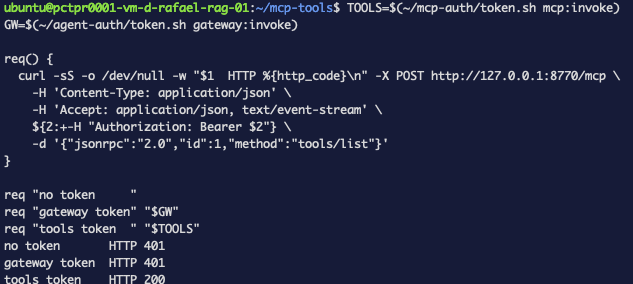
The first line is the gap agent orchestration part 4 admitted to, now closed. Before this change that request returned the full five-tool catalogue to anybody who asked — and with the right token, it still does:
curl -sS -X POST http://127.0.0.1:8770/mcp \
  -H "Authorization: Bearer $TOOLS" \
  -H 'Content-Type: application/json' \
  -H 'Accept: application/json, text/event-stream' \
  -d '{"jsonrpc":"2.0","id":1,"method":"tools/list"}' \
  | tr -d '\r' | sed -n 's/^data: //p' | jq '.result.tools | length, (.[].name)'
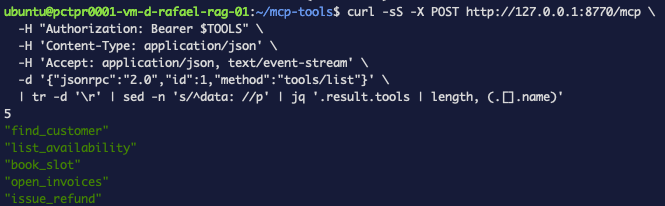
Same five tools as before. Authentication changed who may ask, not what the server does.
The second is the one worth pausing on. That is a valid, unexpired, correctly signed authentik token that works perfectly well against the gateway, and the tools server refuses it. Ask the server why — sending the request again first, so the answer is at the end of the log rather than buried under whatever has hit the server since:
GW=$(~/agent-auth/token.sh gateway:invoke)

curl -sS -o /dev/null -w 'gateway token: HTTP %{http_code}\n' -X POST http://127.0.0.1:8770/mcp \
  -H "Authorization: Bearer $GW" \
  -H 'Content-Type: application/json' \
  -H 'Accept: application/json, text/event-stream' \
  -d '{"jsonrpc":"2.0","id":1,"method":"tools/list"}'

tail -12 ~/mcp-tools/server.log
WARNING  Bearer token rejected for client aObZ8KvKsKVdQ4MuSsTINp0f65Puz5fzXUUBC6iQ
         : issuer mismatch (got 'http://10.80.4.212:9100/application/o/agent-gateway/',
                       expected 'http://10.80.4.212:9100/application/o/agent-tools/')
INFO     Auth error returned: invalid_token (status=401)
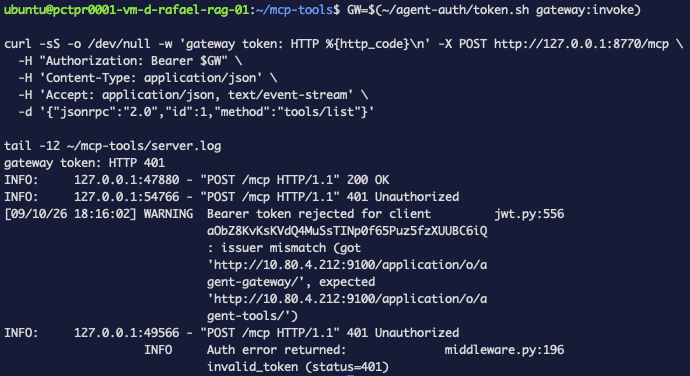
It failed on iss, not on scope. That is the separate provider paying off. In authentik each
provider is its own issuer, so a token from the wrong client is rejected at the first gate,
before audience or scope are looked at. Had we taken the easy road and added a second scope to
the gateway's client, the same request would have got several checks further before
required_scopes turned it away. Same outcome, more surface.
Two other things in that log. It names the offending client by ID, and prints both the issuer it
got and the one it wanted — so debugging is a tail, not a guess. And the caller receives only
invalid_token, which is correct: telling a client which issuer you expected is telling an
attacker what to forge.
grep -iE 'invalid|token|401' server.log returns the last line and hides the first. You get
invalid_token (status=401) and conclude the server won't say why. It says why, on the line
above, wrapped across four lines that your pattern doesn't match. Read it unfiltered.
Step 5 — The client half, and a helper that cannot help
The tools server is now protected, which means every script from part 3 and part 4 is broken. They connect with no token.
FastMCP documents exactly the right thing for this: ClientCredentialsOAuthProvider, which runs
the client-credentials grant itself and — the part that matters given our 300-second tokens —
"when the token expires it is re-acquired automatically on the next request."
It does not work here. Try it and you get:
mcp.client.auth.exceptions.OAuthTokenError: Token exchange failed (404): Not Found
The server log explains what actually happened:
GET  /.well-known/oauth-authorization-server      404
POST /token                                        404
GET  /.well-known/oauth-protected-resource         404
GET  /.well-known/oauth-protected-resource/mcp     404
GET  /.well-known/openid-configuration             404
The provider takes the MCP server's URL, not a token endpoint, because "the token endpoint
is discovered from the server's OAuth metadata." Our server publishes none — and FastMCP's own
documentation says so, on a different page: "TokenVerifier focuses exclusively on token
validation without providing OAuth discovery metadata."
So the two pages are consistent and the combination is a documented dead end. You just have to
read both to find that out, and the failure tells you none of it: four 404s you only see if you
are watching the server, a fallback that POSTs /token at the resource server, and an error
that never mentions discovery.
The path the docs point to instead is the client obtaining its token separately. BearerAuth
takes a token you already have and attaches it to every request — worth proving standalone
before wiring it into four scripts:
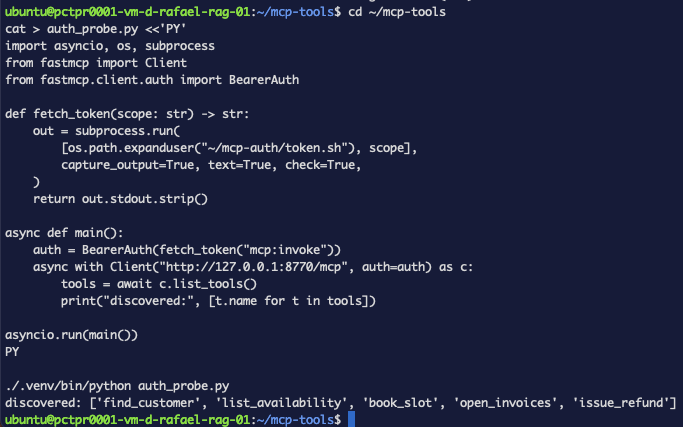
That works, so it can be shared. One helper, used by every script in the series:
"""One authenticated MCP client, shared by every agent in the series."""
import os
import subprocess

from fastmcp import Client
from fastmcp.client.auth import BearerAuth

MCP_URL = "http://127.0.0.1:8770/mcp"
TOKEN_SH = os.path.expanduser("~/mcp-auth/token.sh")


def fetch_token(scope: str = "mcp:invoke") -> str:
    """Mint a short-lived token from authentik via the client credentials grant."""
    out = subprocess.run([TOKEN_SH, scope], capture_output=True, text=True, check=True)
    return out.stdout.strip()


def authed_client() -> Client:
    return Client(MCP_URL, auth=BearerAuth(token=fetch_token()))
Each agent then changes by two lines — an import, and what it hands MCPAdapter:
from mcp_auth import authed_client

async with MCPAdapter(authed_client()) as adapter:
MCPAdapter accepts a configured Client as readily as a URL string, which
part 3 used for caching without needing it
for anything else. Here it is what lets the token in.
BearerAuth is the explicit form. FastMCP also accepts the token as a bare string —
Client(url, auth=token) — and adds the scheme itself; its documentation is specific that you
"do not include the Bearer prefix" if you do. The class is worth the extra import here only
because it makes the intent obvious at the call site.
BearerAuth holds one fixed string. A token minted when the agent starts is dead 300 seconds
later, and nothing re-acquires it — the automatic renewal was the one thing
ClientCredentialsOAuthProvider would have given us. For a short run it does not matter. For an
agent that waits on a human, as
part 3's refund does, it certainly can. Either
raise the token lifetime on the provider, or mint per call rather than per client.
Step 6 — Prove a tool actually runs
Discovery is not execution. A token that lists tools might still fail at the call, so check the thing that touches the database:
TOOLS=$(~/mcp-auth/token.sh mcp:invoke)

curl -sS -X POST http://127.0.0.1:8770/mcp \
  -H "Authorization: Bearer $TOOLS" \
  -H 'Content-Type: application/json' \
  -H 'Accept: application/json, text/event-stream' \
  -d '{"jsonrpc":"2.0","id":1,"method":"tools/call","params":{"name":"find_customer","arguments":{"query":"Maria"}}}' \
  | tr -d '\r' | sed -n 's/^data: //p' | jq -c '.result.content[0].text // .error'
"[{\"id\":1,\"name\":\"Maria Alvarez\",\"email\":\"maria@example.com\"}]"

Drop the Authorization header and the same call returns 401. A real row with a token, nothing
without — that is authentication reaching execution, not just the catalogue.
You can put a JWT verifier in front of an MCP tools server so it refuses anonymous callers and refuses valid tokens issued to a different client — and read the server log to know which of issuer, audience, scope or expiry did the refusing.
Troubleshooting — the errors this run actually produced
Token exchange failed (404): Not Found
ClientCredentialsOAuthProvider against a JWTVerifier server. Discovery found nothing and it
fell back to guessing. See Step 5; use BearerAuth.
2 validation errors ... Missing required argument
The token was fine — this comes from inside the tool. params.name is the tool's name,
params.arguments are its parameters, and both nest a field called name. find_customer
takes query.
The log says only invalid_token
You grepped it. See the warning in Step 4.
Every script from parts 3 and 4 suddenly fails
Expected. They connect without a token. Step 5.
What this did and didn't buy you
Done: an MCP server that authenticates every caller, a credential that is not the gateway's, a refusal that happens at the issuer rather than deep in the scope check, and a log that names which client was turned away and why.
Not done:
- No per-tool authorisation, and this is less than agent orchestration part 4 promised. That
post closed by saying the next step was to "authenticate the tool call, so the server knows
which agent is asking and refuses
issue_refundto anything that isn't billing." Half of that is now true: the call is authenticated. The other half is not.required_scopesis a property of the server, not of a tool, so every holder ofmcp:invokecan callissue_refundexactly as easily asfind_customer, and the server still cannot tell the scheduler from the billing agent. Splitting tools per agent, as part 4 did, remains a client-side arrangement. - Tokens still expire mid-run, as described in Step 5.
- Still plain HTTP. A bearer token in the clear is a credential in the clear.
- The gateway's own provider is still over-permissioned, visible in Step 1's output and unfixed since Part 5 pointed at it.
What's next
Per-tool authorisation is the obvious gap and it does not have an obvious answer. required_scopes
gates the server; gating issue_refund differently from find_customer means either a second
server with its own client, or authorisation inside each tool body reading the verified claims.
The first is more boxes and a clean boundary. The second is a check on every tool you ever write,
which is precisely the failure mode
part 4 warned about for policy-in-the-tool.