Give each MCP tool its own scope, and return a refusal the client can act on

 +
+
- 1Lock down Docker networks
- 2Run containers as non-root
- 3Identity in front of every port
- 4Membership, not just an account
- 5An identity for the agent, not a key
- 6A tool server that checks who is asking
- 7Where the agent can go, not just what it can call
- 8Move the daemon off root
- 9Run the model's own code without trusting it
- 🏆A scope per tool, and a refusal clients can act on
Part 6 put required_scopes=["mcp:invoke"] on the JWT
verifier and called the server authorised. It is, in the sense that an unauthenticated caller
gets nothing. It is not, in the sense that matters: mcp:invoke opens every tool on the server.
The same token that lets an agent run find_customer lets it run issue_refund.
That is the whole gap. A read-only agent and a refund-issuing agent hold identical credentials, and the only thing standing between "look up Maria" and "refund invoice 2" is that nobody asked.
This post closes it, badly first and then properly, because the badly is what most people ship and the difference only shows up in what the client can do about a refusal.
Both versions refuse the same call — a read-only token asking for issue_refund. They differ in
where the scope is checked, and that one choice decides what the client gets back:
Prerequisites
Parts 5 and 6, specifically:
- Authentik issuing client-credentials tokens to an
agent-toolsprovider (part 5) - A FastMCP server verifying those tokens against the JWKS endpoint (part 6)
~/mcp-auth/token.sh, which takes a scope string and returns an access token
Part 6's server stays on :8770 throughout. The two versions below run on :8771 and :8772
so you can compare all three without stopping anything.
Step 1 — Two new scopes
Scopes are Property Mappings in Authentik. Customization → Property Mappings → New Property Mapping → Scope Mapping, twice:
| Name | Scope name | Description |
|---|---|---|
office-read | office:read | Look up customers and invoices |
office-refund | office:refund | Issue refunds |
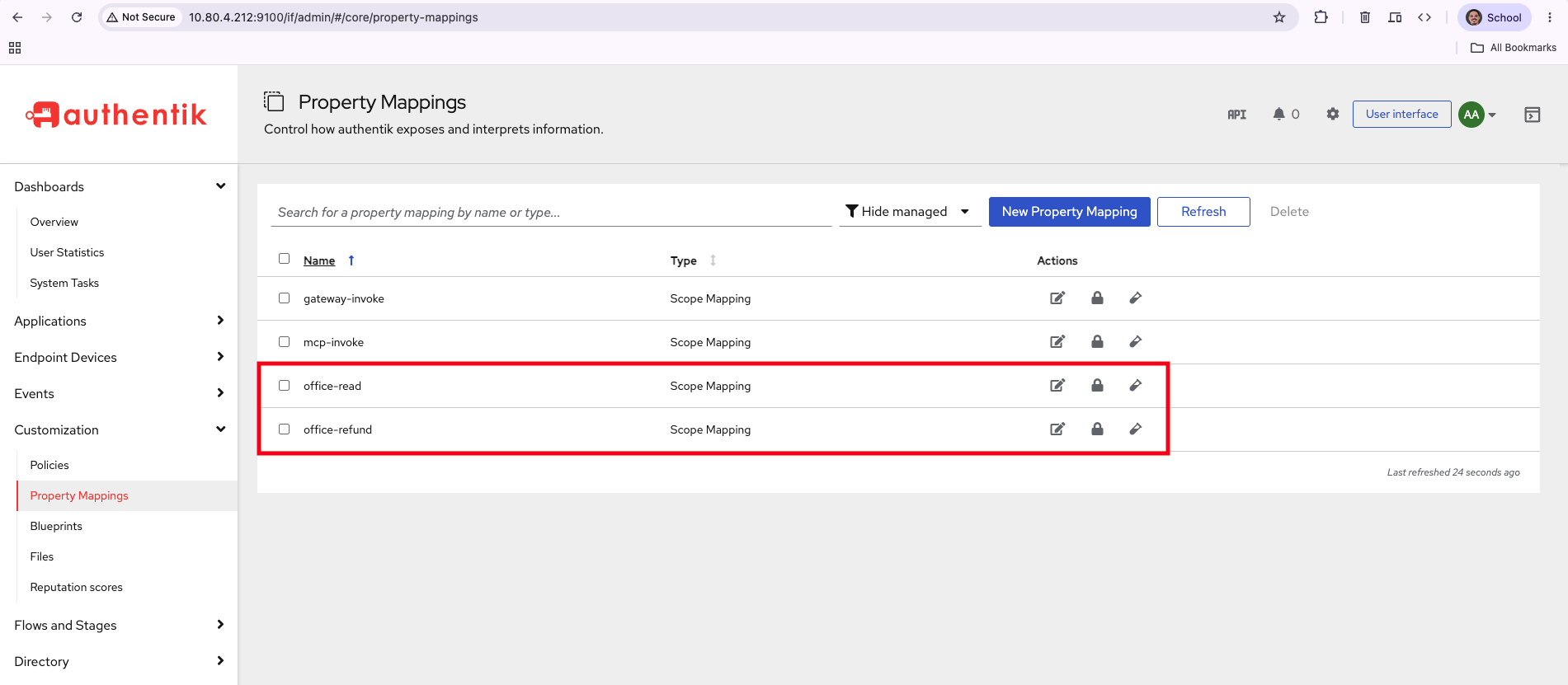
Creating them is not enough. A provider will only issue a scope it has been given, so open Applications → Providers → agent-tools → Edit and move both into Selected Scopes.
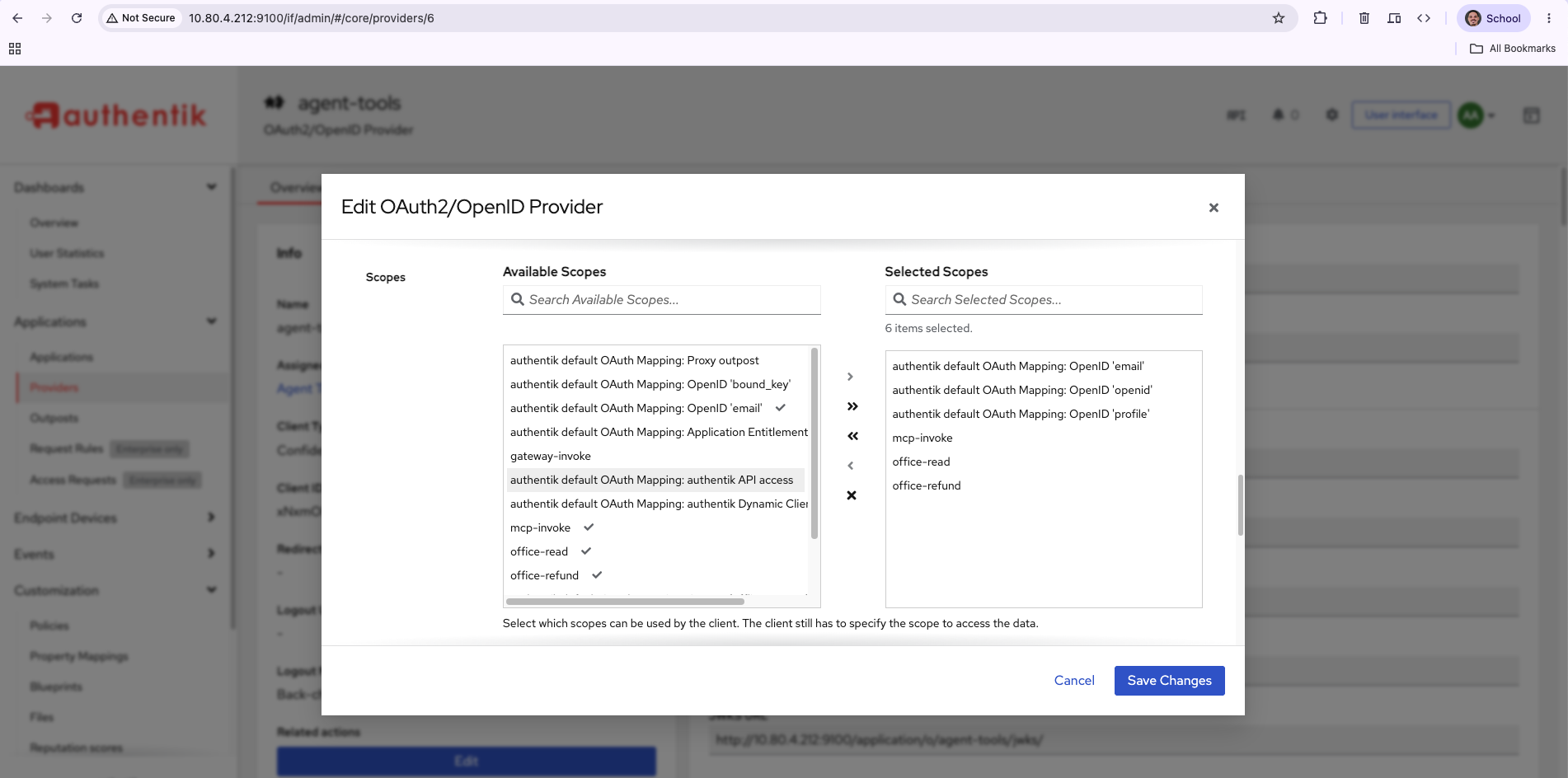
Note the line under the picker: "Select which scopes can be used by the client. The client still
has to specify the scope to access the data." Both halves matter. Selecting a scope here does not
put it in every token — it permits the client to ask. A client that asks for nothing gets nothing,
which is why every token.sh call below passes an explicit scope string.
Confirm the token actually carries what you asked for:
~/mcp-auth/token.sh "mcp:invoke office:read" \
  | cut -d. -f2 | base64 -d 2>/dev/null | jq .scope
"mcp:invoke office:read"
If that comes back without office:read, the scope is not on the provider — fix that before
writing any server code, or you will spend an hour debugging enforcement that is working
correctly on a token that was never scoped.
Step 2 — The obvious implementation
Keep required_scopes=["mcp:invoke"] on the verifier as the price of admission, then ask per
tool whether the caller holds what that operation needs. FastMCP exposes the verified token
through get_access_token(), so a decorator can read the claims the verifier already checked:
from fastmcp.exceptions import ToolError
from fastmcp.server.dependencies import get_access_token

def requires(scope: str):
    def decorate(fn):
        @functools.wraps(fn)
        async def wrapper(*args, **kwargs):
            token = get_access_token()
            held = set(getattr(token, "scopes", None) or [])
            if scope not in held:
                raise ToolError(
                    f'insufficient_scope: this tool requires "{scope}"; '
                    f'token carries {sorted(held) or "nothing"}'
                )
            return await fn(*args, **kwargs)
        return wrapper
    return decorate
Then one line per tool:
@mcp.tool
@requires("office:read")
async def find_customer(query: str) -> list[dict]: ...

@mcp.tool
@requires("office:refund")
async def issue_refund(invoice_id: int) -> str: ...
Run it on :8771 and drive both tools with both tokens:
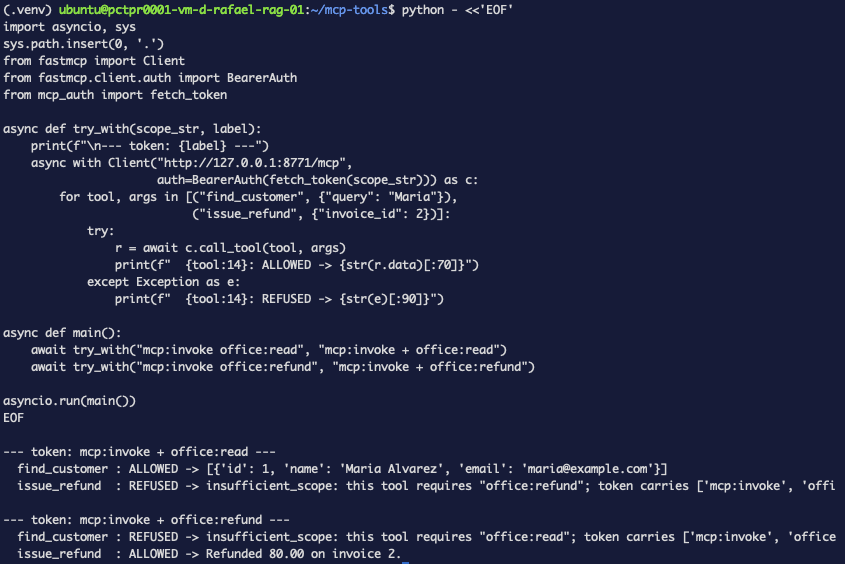
--- token: mcp:invoke + office:read ---
  find_customer  : ALLOWED -> [{'id': 1, 'name': 'Maria Alvarez', ...}]
  issue_refund   : REFUSED -> insufficient_scope: this tool requires "office:refund"

--- token: mcp:invoke + office:refund ---
  find_customer  : REFUSED -> insufficient_scope: this tool requires "office:read"
  issue_refund   : ALLOWED -> Refunded 80.00 on invoice 2.
That is real enforcement. The refund token cannot read, the read token cannot refund, and the refusal names the missing scope. For a lot of deployments this is where you stop.
Step 3 — Why that refusal is not good enough
Watch the HTTP layer rather than the client library.
TOK=$(~/mcp-auth/token.sh "mcp:invoke office:read")
curl -sS -i -X POST http://127.0.0.1:8771/mcp \
  -H "Authorization: Bearer $TOK" \
  -H "Content-Type: application/json" \
  -H "Accept: application/json, text/event-stream" \
  -d '{"jsonrpc":"2.0","id":1,"method":"tools/call","params":{"name":"issue_refund","arguments":{"invoice_id":2}}}'
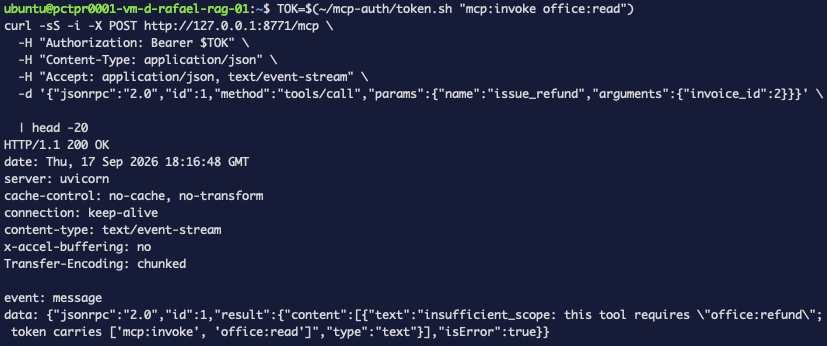
HTTP/1.1 200 OK
content-type: text/event-stream

data: {"jsonrpc":"2.0","id":1,"result":{"content":[{"text":"insufficient_scope: this tool
requires \"office:refund\"; token carries ['mcp:invoke', 'office:read']","type":"text"},
"isError":true}}
HTTP 200. The request succeeded; the tool declined. That is correct JSON-RPC semantics and it is useless to an OAuth client.
An OAuth client that wants to step up — go back to the authorization server and ask for
office:refund — is watching for a 401 or 403 with a WWW-Authenticate header telling it
what to request. It does not parse English out of a tool result. So the refusal is legible to a
human reading logs and invisible to the machinery designed to handle exactly this case.
It also arrives late. The tool body runs after routing, after session setup, after the server has committed to a successful response. By then there is no status line left to change.
Step 4 — The challenge the spec actually wants
Getting a 403 means checking scopes before the JSON-RPC layer answers, which means ASGI
middleware wrapping the FastMCP app:
class ScopeChallengeMiddleware:
    def __init__(self, app):
        self.app = app

    async def __call__(self, scope, receive, send):
        if scope["type"] != "http" or scope["method"] != "POST":
            return await self.app(scope, receive, send)

        # Buffer the body so we can inspect it and still pass it on.
        chunks, more = [], True
        while more:
            msg = await receive()
            chunks.append(msg.get("body", b""))
            more = msg.get("more_body", False)
        body = b"".join(chunks)

        needed = None
        try:
            rpc = json.loads(body)
            if rpc.get("method") == "tools/call":
                needed = TOOL_SCOPES.get((rpc.get("params") or {}).get("name"))
        except Exception:
            pass

        if needed and needed not in token_scopes(dict(scope.get("headers") or [])):
            challenge = (
                f'Bearer error="insufficient_scope", scope="{needed}", '
                f'resource_metadata="{RESOURCE_METADATA}", '
                f'error_description="This operation requires the {needed} scope"'
            )
            await send({"type": "http.response.start", "status": 403,
                        "headers": [(b"content-type", b"application/json"),
                                    (b"www-authenticate", challenge.encode())]})
            await send({"type": "http.response.body",
                        "body": json.dumps({"error": "insufficient_scope",
                                            "scope": needed}).encode()})
            return

        # Replay the buffered body downstream.
        replayed = False
        async def replay():
            nonlocal replayed
            if not replayed:
                replayed = True
                return {"type": "http.request", "body": body, "more_body": False}
            return await receive()

        await self.app(scope, replay, send)

app = ScopeChallengeMiddleware(mcp.http_app(stateless_http=True))
Same request, against :8772:
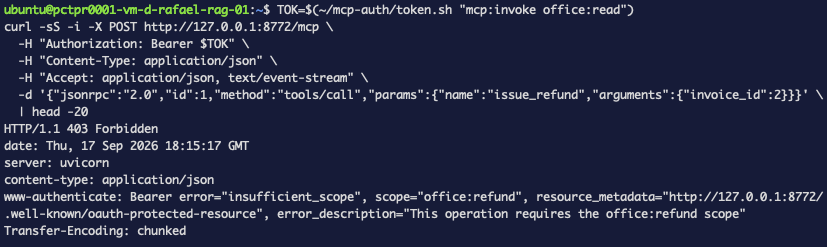
HTTP/1.1 403 Forbidden
www-authenticate: Bearer error="insufficient_scope", scope="office:refund",
  resource_metadata="http://127.0.0.1:8772/.well-known/oauth-protected-resource",
  error_description="This operation requires the office:refund scope"
Now a client has something to act on: the status says refused, scope= says what to ask for, and
resource_metadata says where to look up how. That is step-up authorization as a protocol rather
than as a log message.
Step 5 — What it cost
The middleware works. It is also worse code than the decorator, in three specific ways, and pretending otherwise would be dishonest.
It does not know what a tool is. ASGI middleware sees bytes and headers. To find out which tool is being called it parses the JSON-RPC envelope itself and looks the name up in a table it has to maintain:
TOOL_SCOPES = {
    "find_customer": "office:read",
    "open_invoices": "office:read",
    "issue_refund":  "office:refund",
}
That table is a second source of truth. Add a tool and forget the entry and it is unprotected — silently, because the middleware just passes through anything it does not recognise. The decorator could not have that bug: the requirement sat on the function.
It decodes the token unverified. The middleware runs upstream of the verifier, so the verified claims do not exist yet. It splits the JWT and base64-decodes the payload without checking the signature:
payload = auth.split(None, 1)[1].split(".")[1]
claims = json.loads(base64.urlsafe_b64decode(payload + "=" * (-len(payload) % 4)))
This is not the hole it looks like — the verifier still runs downstream and still rejects a forged token, so nothing reaches a tool on a bad signature. But the scope decision is made on unauthenticated bytes, and the only reason that is survivable is the second check behind it. It is a wart, not a vulnerability, and it is the kind of thing worth writing down before someone later removes the "redundant" verifier.
It buffers every request body. To read the envelope and still pass it downstream, the
middleware drains receive() into memory and replays it. Fine for JSON-RPC calls; think harder
before putting this in front of large uploads.
Troubleshooting — the errors this run actually produced
insufficient_scope on a tool you did grant
Check the token, not the server:
~/mcp-auth/token.sh "mcp:invoke office:refund" | cut -d. -f2 | base64 -d 2>/dev/null | jq .scope
If office:refund is missing, the scope exists as a Property Mapping but was never moved into
the provider's Selected Scopes. Authentik silently drops scopes a client is not permitted to
request rather than erroring, so the token comes back valid and short.
The middleware never fires
It only inspects POST. MCP clients open a GET for the event stream first, and that request
carries no JSON-RPC envelope — if you are watching the wrong request you will conclude the
middleware is dead. Confirm with the curl above, which is a single POST.
Every tool suddenly returns 403
TOOL_SCOPES is keyed by the tool's registered name, which is the function name, not the
decorated label. Rename a function and the table stops matching. The pass-through case is the
dangerous direction (unprotected), but a typo in the table produces this one.
The 403 body is empty in some clients
The challenge lives in the WWW-Authenticate header. Clients that only log response bodies
will show you {"error":"insufficient_scope"} and nothing about which scope. Use curl -i.
What this did and didn't buy you
It bought genuine per-tool authorisation: two tokens that differ by one scope, each able to run exactly one of two tools, proven at the HTTP layer rather than asserted. And with the middleware, a refusal a client can programmatically recover from.
It did not buy a clean design. Both implementations are compromises pointing opposite ways:
tool decorator (:8771) | ASGI middleware (:8772) | |
|---|---|---|
| Scope requirement lives | on the function | in a separate table |
| Reads verified claims | yes | no — decodes unverified, verifier runs after |
| Refusal | HTTP 200, isError: true | HTTP 403 + WWW-Authenticate |
| Client can step up | no | yes |
| New tool unprotected by default | no | yes |
The honest summary is that the correct protocol behaviour requires leaving the abstraction the framework gives you, and the ergonomic version cannot produce it. If your clients do not implement step-up — and most agent clients today do not — the decorator is the better trade. If they do, you pay for it with a table you must remember to update.
It also did not buy authorisation that survives the tool doing something else. issue_refund
is gated on office:refund; nothing stops a future find_customer from being edited to write.
Scopes gate entry, not behaviour — which is the same boundary
part 4 drew around policy-in-the-tool.
What's next
The obvious remaining gap is that both versions trust the token's scope list and nothing else.
Neither asks who the caller is or what they are acting on — a token with office:refund
refunds any invoice, for any customer, for any amount. That is object-level authorisation, and
it does not live in OAuth scopes at all.