The binding that wasn't there: group access control, and what SSO doesn't protect

 +
+
- 1Lock down Docker networks
- 2Run containers as non-root
- 3Identity in front of every port
- 4Membership, not just an account
- 5An identity for the agent, not a key
- 6A tool server that checks who is asking
- 7Where the agent can go, not just what it can call
- 8Move the daemon off root
- 9Run the model's own code without trusting it
- 🏆A scope per tool, and a refusal clients can act on
Part 3 put authentik in front of Langfuse and ended with an admission: the bindings step was left empty, so every account in authentik could reach Langfuse and nothing would warn you.
This part closes that gap on the LiteLLM gateway — and the closing went wrong in a way worth more than the procedure. We configured the bindings in authentik's wizard, watched them appear in the wizard's own table, submitted, and ended up with zero bindings saved. The application was open to everyone, the UI said nothing, and the only reason we found out is that we tested with an account that should have been refused and wasn't.
Then, once access control genuinely worked, we called the gateway's API from a shell with no account, no session and no group. It answered normally. That one isn't a bug — it's the difference between a control plane and a data plane, and assuming SSO covers both is how people conclude they've secured something they haven't.
One WEC Instance: 8 vCPU AMD EPYC 7601, 15 GB RAM, Docker 29.1.3, kernel 5.15.
authentik 2026.8.1, the same instance from Part 3 on host port 9100. LiteLLM
main-stable from Part 1 of the gateway series,
bound to 127.0.0.1:4000, models served over WEC Inference.
Plain HTTP on a private LAN, as in Part 3.
What's new here
Part 3 taught the wizard — application, provider, redirect URI, scopes. That isn't repeated; it's all in Part 3 and the steps are identical for any app. Three things are new:
A group, as the unit you grant access to, so that adding somebody to a team and giving them access are the same action.
A binding, which attaches that group to an application, so reaching it requires membership rather than merely existing.
A boundary, demonstrated rather than asserted: what SSO protects, and what it doesn't touch at all.
Prerequisites
- A working authentik, ideally the one from Part 3
- A running LiteLLM gateway, from Part 1 of the gateway series
- Its
LITELLM_MASTER_KEY, which you'll need to create a virtual key - SSH access to the box, because the gateway is bound to
127.0.0.1
Two doors, one of them guarded
Two boxes, no arrow between them — that's the point. Everything this post configures lives in the left one. The right one never consults authentik at all.
There is also a third way in that the diagram deliberately leaves out, because it belongs to neither plane: LiteLLM's master key logs into the Admin UI directly, skipping the group check entirely. We hit it in Step 5.
Step 1 — A group, and two accounts
Directory → Groups → New Group, name it gateway-admins, and leave Superuser
privileges off. That flag makes members administrators of authentik itself and has
nothing to do with which applications they can reach.
authentik ships three groups already — authentik Admins, authentik Agent-Users,
authentik Read-only — and authentik Admins already contains your akadmin. Binding that
one instead would work today and quietly mean "anyone I ever make an authentik admin," which
is not the same intent.
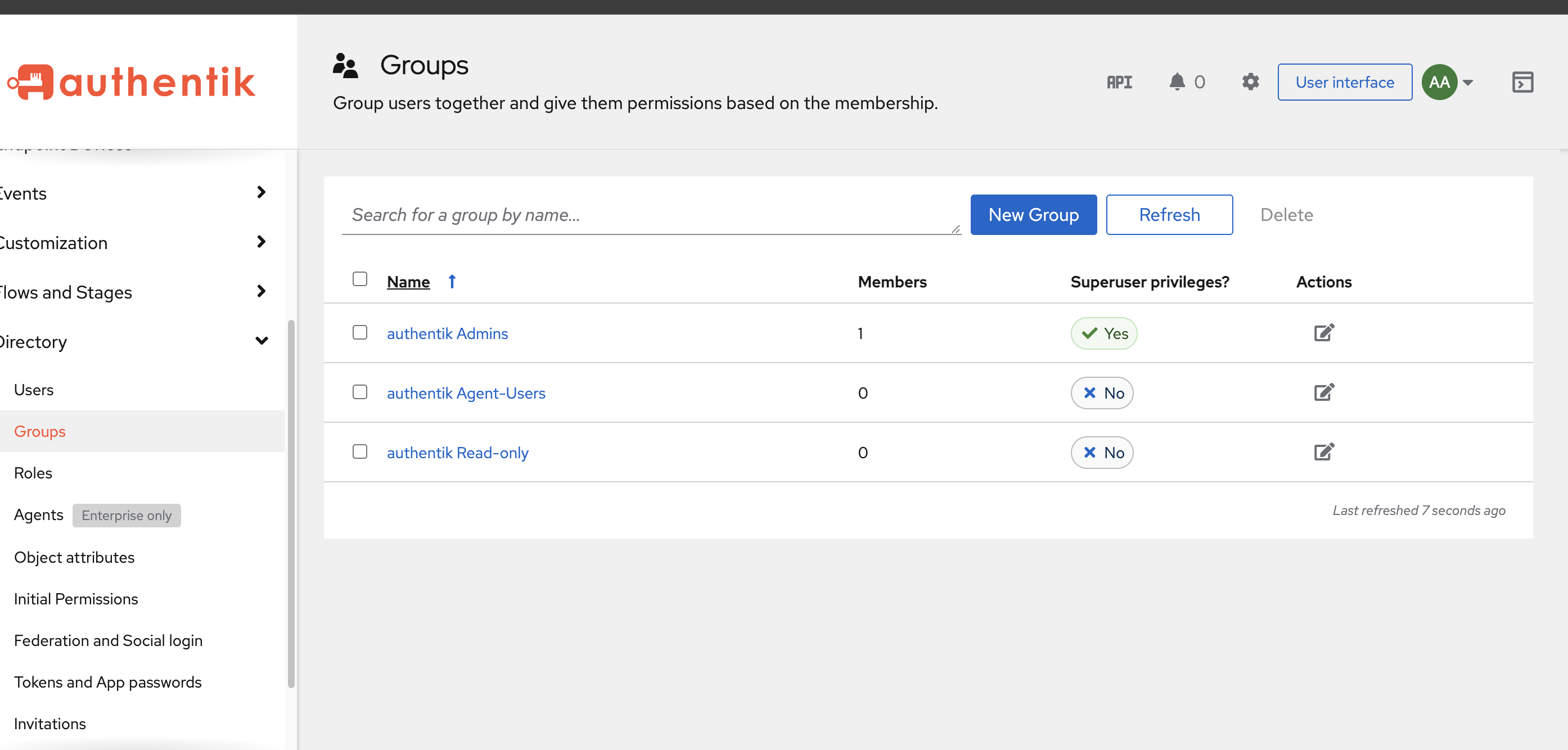
Add akadmin to gateway-admins. Then Directory → Users → New User, type Internal,
username contractor, and no groups at all.
Internal rather than External so that the only difference between the two accounts is membership — any other difference muddies the result. Not a Service Account: those are machine-to-machine and don't do interactive logins.
authentik creates users without a password, and the Edit dialog has no password field — it's a separate action on the user's detail page. From the shell:
cd ~/authentik && docker compose exec server ak shell -c "
from authentik.core.models import User
u = User.objects.get(username='contractor')
u.set_password('Contractor123!')
u.save()
print('password set for', u.username)
" 2>/dev/null | tail -2
ak shellEvery ak shell call prints roughly sixty lines of bootstrap JSON before your output.
2>/dev/null | tail -N drops the noise and keeps the last N lines. Used throughout below.
Step 2 — Register the gateway, and watch the slug
Run the Part 3 wizard: application LiteLLM, provider OAuth2/OpenID, authorization
flow default-provider-authorization-explicit-consent, client type Confidential.
The gateway is published on 127.0.0.1:4000, so your browser can't reach it — and an OIDC
login happens in a browser. Open a tunnel from your workstation:
ssh -L 4000:127.0.0.1:4000 ubuntu@10.80.4.212
ssh -L warns, then carries on without the tunnelIf something already holds local port 4000, ssh prints bind: Address already in use and
still gives you a working shell — with a dead forward. The only symptom is
ERR_CONNECTION_REFUSED in the browser, which reads like the gateway being down. Check the
port before blaming the gateway: lsof -nP -iTCP:4000 -sTCP:LISTEN.
Everything the browser types is now localhost:4000, so that's the redirect URI, mode
Strict:
http://localhost:4000/sso/callback
Now the first surprise. Ask authentik what it actually named things:
cd ~/authentik && docker compose exec server ak shell -c "
from authentik.core.models import Application
for a in Application.objects.all():
    print(repr(a.name), '->', repr(a.slug))
" 2>/dev/null | tail -5
'Langfuse' -> 'langfuse'
'LiteLLM' -> 'lite-llm'
lite-llm, not litellm. The slugifier read the capitals in "LiteLLM" and split them.
Part 3 called the slug load-bearing because it lands in the issuer URL, and here it is:
http://10.80.4.212:9100/application/o/lite-llm/. Set the slug explicitly rather than
letting a CamelCase name generate one, or carry that hyphen in every URL forever.
Read the credentials back through the real slug:
cd ~/authentik && docker compose exec server ak shell -c "
from authentik.core.models import Application
p = Application.objects.get(slug='lite-llm').get_provider()
print('CLIENT_ID    :', p.client_id)
print('CLIENT_SECRET:', p.client_secret)
" 2>/dev/null | tail -3
Step 3 — The bindings the wizard threw away
The wizard's step 4 is Configure Bindings, and Part 3 walked past it showing No bound policies. This time we didn't walk past it. We bound the group there, the wizard listed it
in its table, and we submitted.
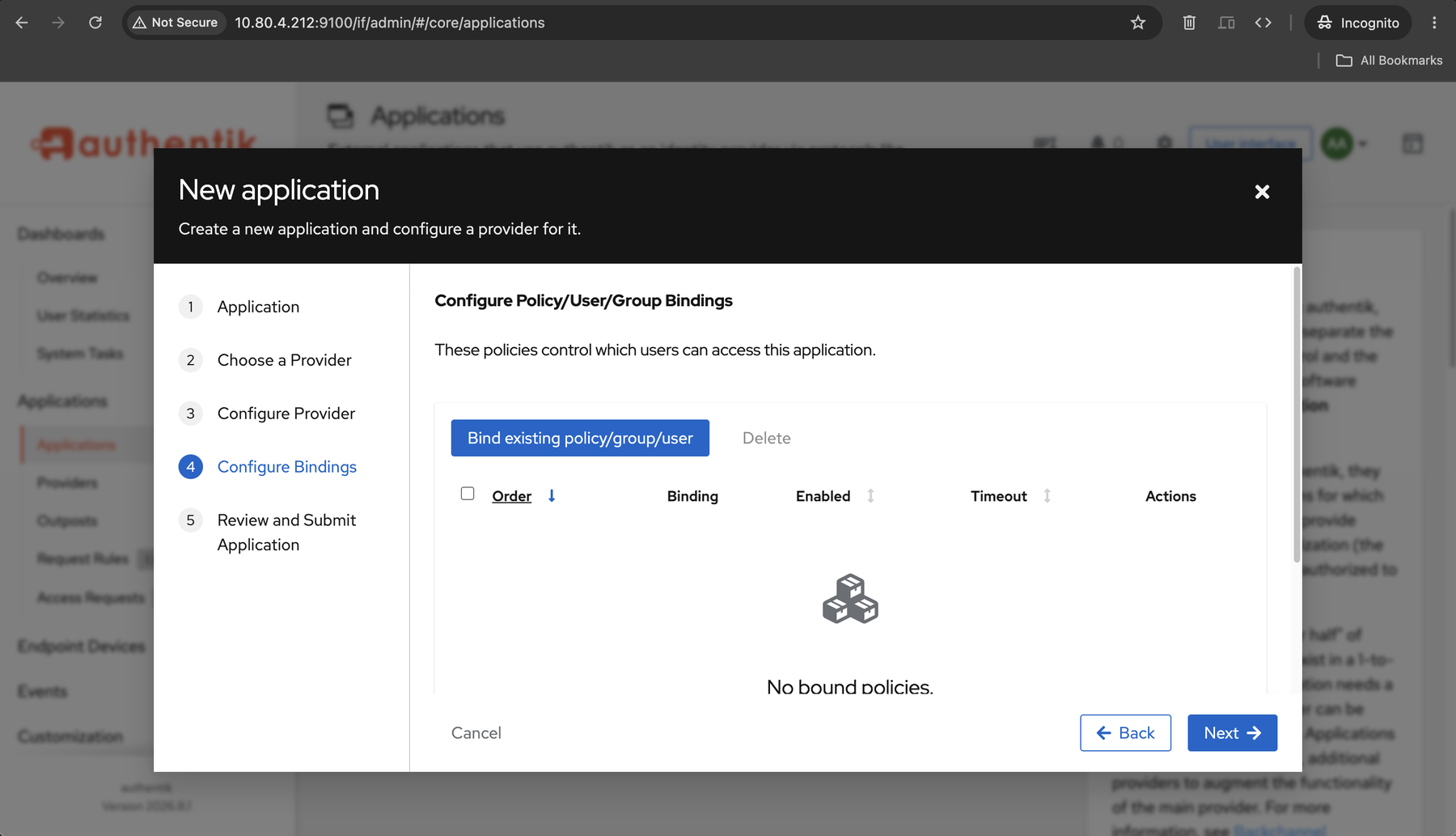
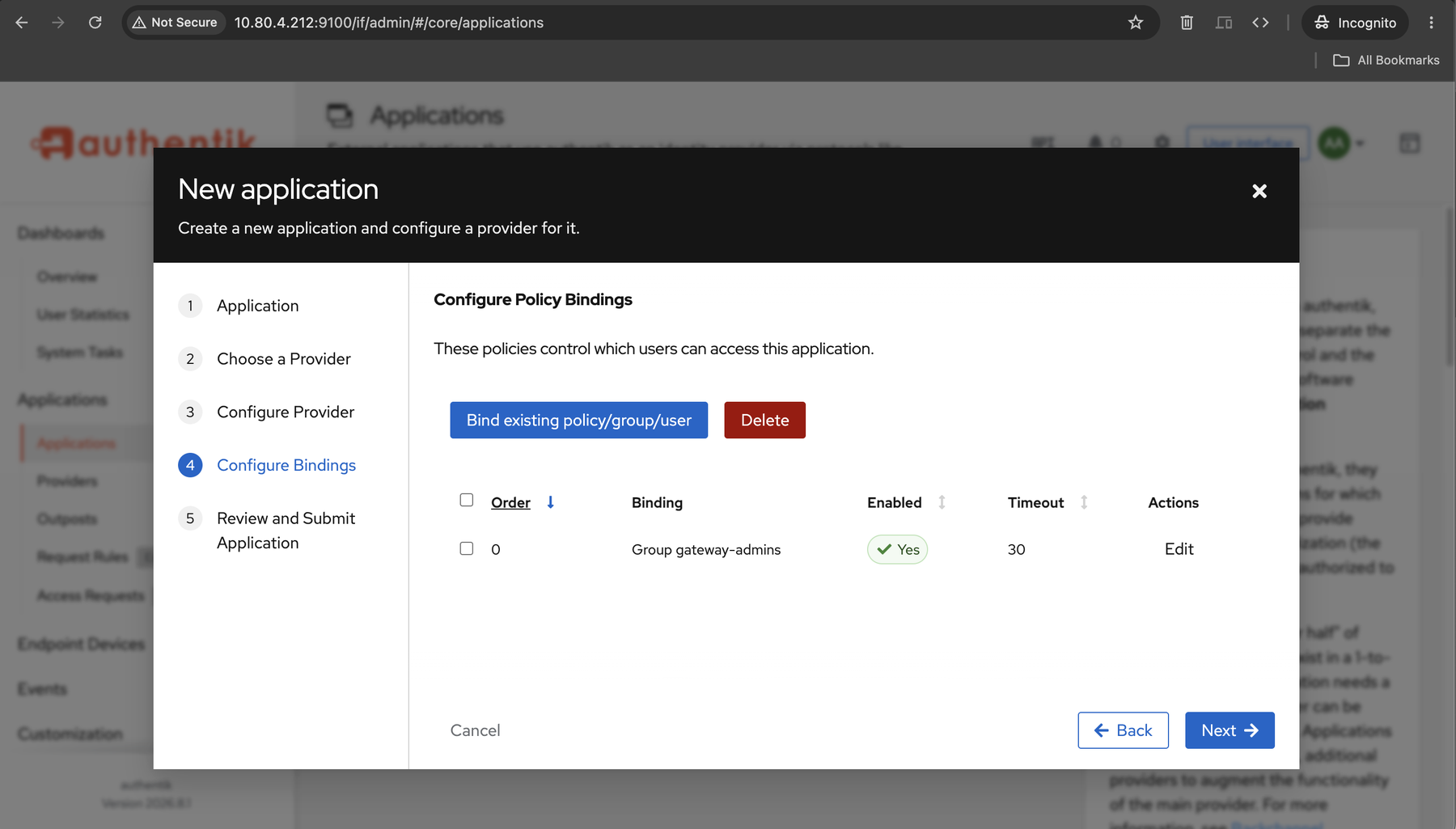
Then we asked the database what existed:
cd ~/authentik && docker compose exec server ak shell -c "
from authentik.core.models import Application
app = Application.objects.get(slug='lite-llm')
bs = list(app.bindings.all())
print('binding count:', len(bs))
for b in bs:
    print('group', b.group, '| enabled', b.enabled, '| negate', b.negate)
" 2>/dev/null | tail -4
binding count: 0
Zero. The application's own bindings tab agreed — No Policies bound. Two independent sources, one conclusion: the wizard displayed access control that was never written.
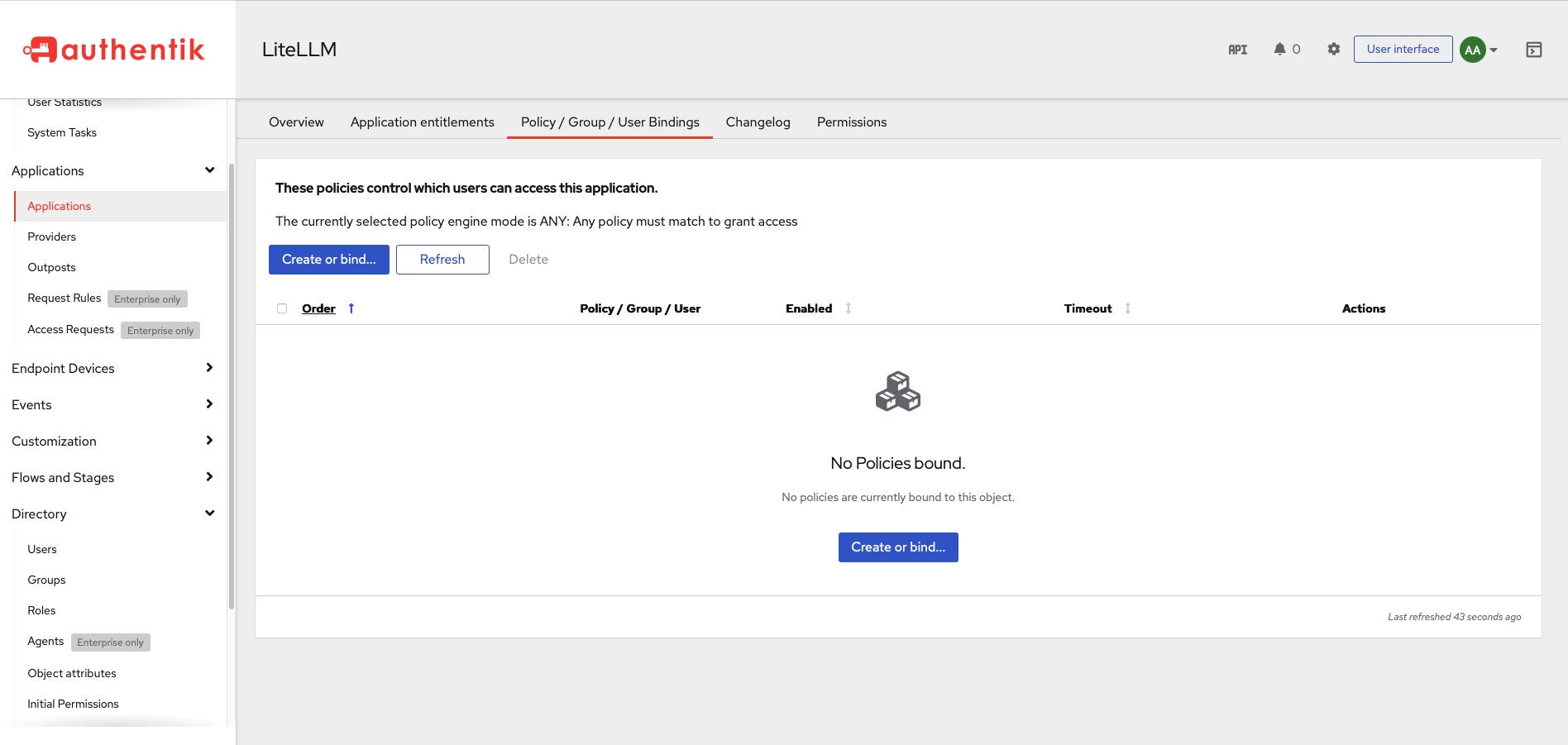
Part 3's lesson was "don't skip bindings." The real hazard is that you can complete them, see your rules in the wizard's table, submit, and end up with an application that admits everyone — no error, no warning, and a UI that looked correct the whole time.
An application with zero bindings isn't broken in any way authentik reports. It's doing exactly what it should: nothing bound means nobody is excluded. Verify bindings from the database or the application's own bindings tab — never from the wizard.
Bind it from the application instead: Applications → LiteLLM → Policy / Group / User
Bindings → Create or bind…, then Bind a group under Bind Existing… → gateway-admins
→ Create.
Pick Bind a group specifically. The Choose Policy Type section below it creates brand-new policies (Event Matcher, Expression, GeoIP); a group binding is already a rule and needs none of them.
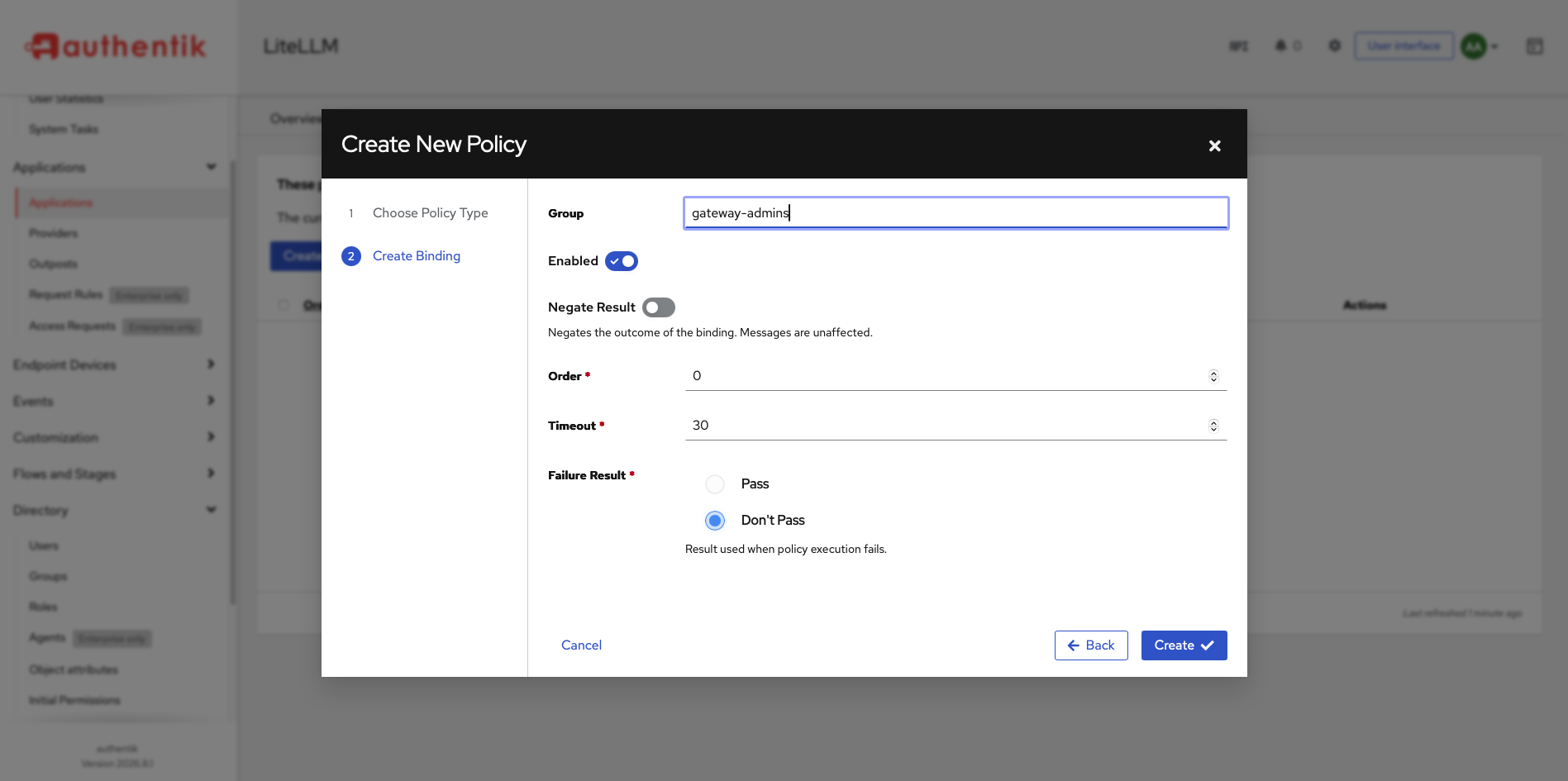
Then verify, because the table is what lied:
binding count: 1
group Group gateway-admins | enabled True | negate False
You can restrict an application to a group instead of leaving it open to every account —
and, more importantly, verify the binding actually persisted (app.bindings.all()) rather
than trusting the wizard's own table.
That page states the mode plainly: "The currently selected policy engine mode is ANY: Any
policy must match to grant access." With one binding, ANY and ALL behave identically. With
two they don't — ANY means one passing rule is enough, so a stray User Contractor
binding sitting beside the group would grant precisely the access this post is trying to
deny.
Step 4 — Point the gateway at authentik
LiteLLM reads generic OIDC settings from GENERIC_*. The endpoints come from the discovery
document:
cat >> ~/llm-gateway/.env <<'EOF'
GENERIC_CLIENT_ID=<client id from Step 2>
GENERIC_CLIENT_SECRET=<client secret from Step 2>
GENERIC_AUTHORIZATION_ENDPOINT=http://10.80.4.212:9100/application/o/authorize/
GENERIC_TOKEN_ENDPOINT=http://10.80.4.212:9100/application/o/token/
GENERIC_USERINFO_ENDPOINT=http://10.80.4.212:9100/application/o/userinfo/
PROXY_BASE_URL=http://localhost:4000
EOF
PROXY_BASE_URL is the one that bites. LiteLLM builds its redirect URI from it, so it has to
equal both what the browser types and what authentik has registered. Ours disagreed on the
first attempt and produced a Redirect URI Error — the redirect_uri in the address bar
is what LiteLLM sent, the Strict value on the provider is what authentik expected, and a
port, a hostname or a trailing slash between them is enough to fail.
The gateway's compose file uses env_file: .env, so unlike Langfuse in Part 3 there's no
override file to write:
cd ~/llm-gateway && docker compose up -d && docker compose exec litellm env | grep -c GENERIC_
Five. Before the edit it was zero — the same class of check Part 3 used to catch variables that never reached the process.
Step 5 — Both sides of the binding
Open http://localhost:4000/ui through the tunnel. The login page carries a finding this
post didn't go looking for.
Login with SSO appears, as intended. Above it sits a username and password form, and
LiteLLM's own panel explains it: "By default, Username is admin and Password is your set
LiteLLM Proxy MASTER_KEY."
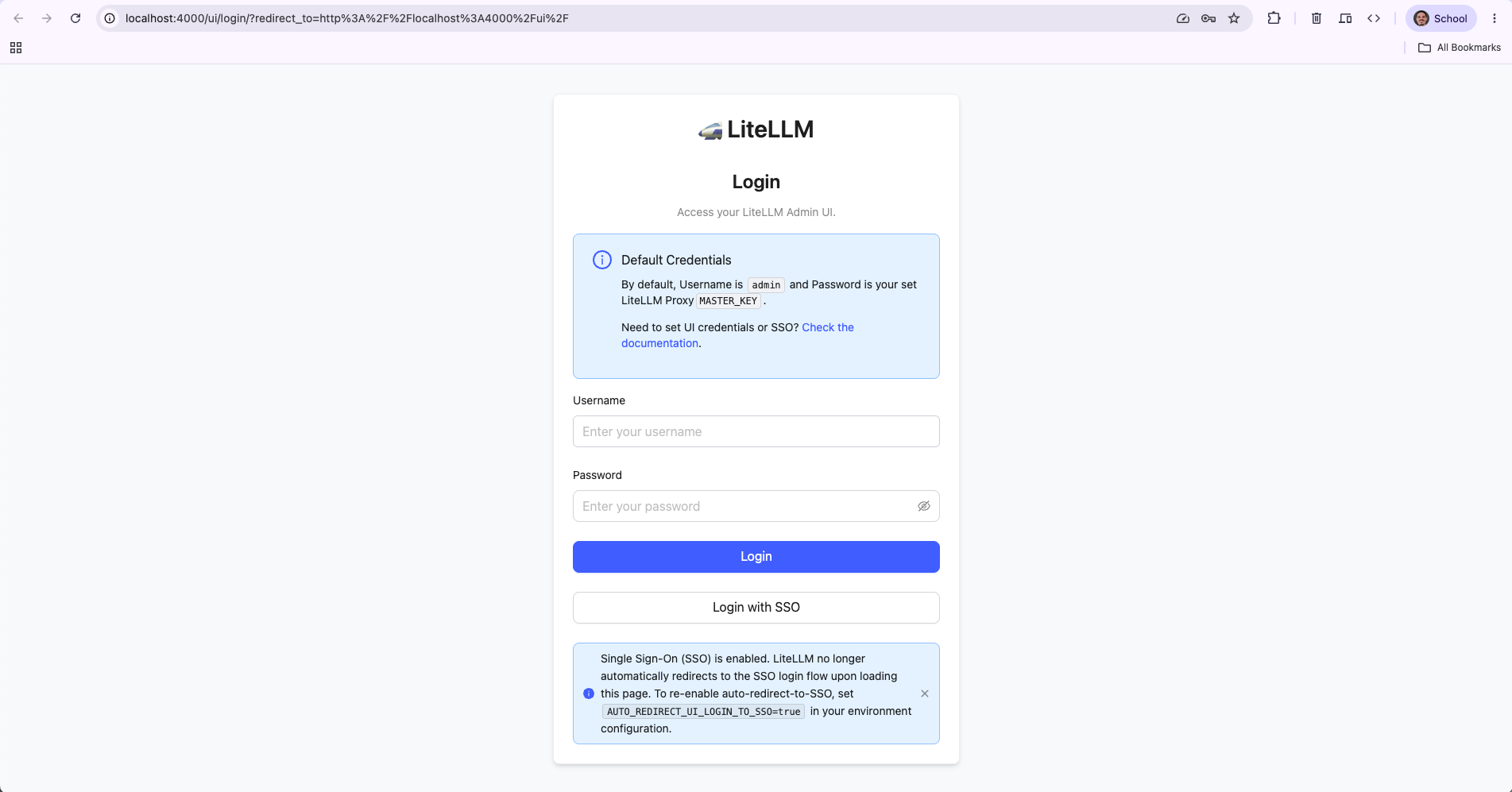
The master key is a complete bypass. Anyone holding it reaches the admin UI without touching authentik, without a group, without a binding. Everything configured in Steps 1–3 sits beside a door that ignores all of it — and that door's key is also the gateway's root credential, able to mint API keys and reach every model.
AUTO_REDIRECT_UI_LOGIN_TO_SSO=true sends /ui straight to authentik instead of showing the
form. It stops advertising the password path; it doesn't remove it. Treat the master key as
a break-glass credential and don't mistake the redirect for a fix.
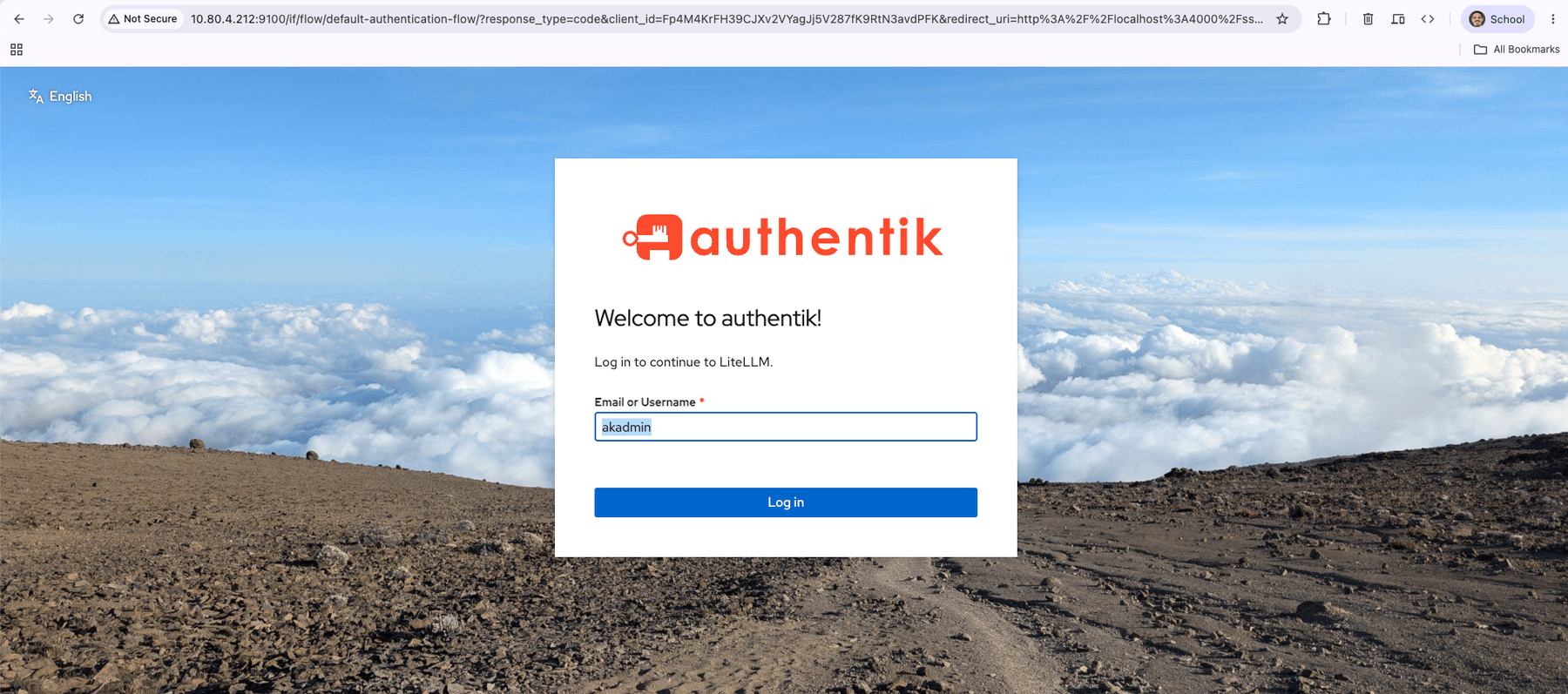
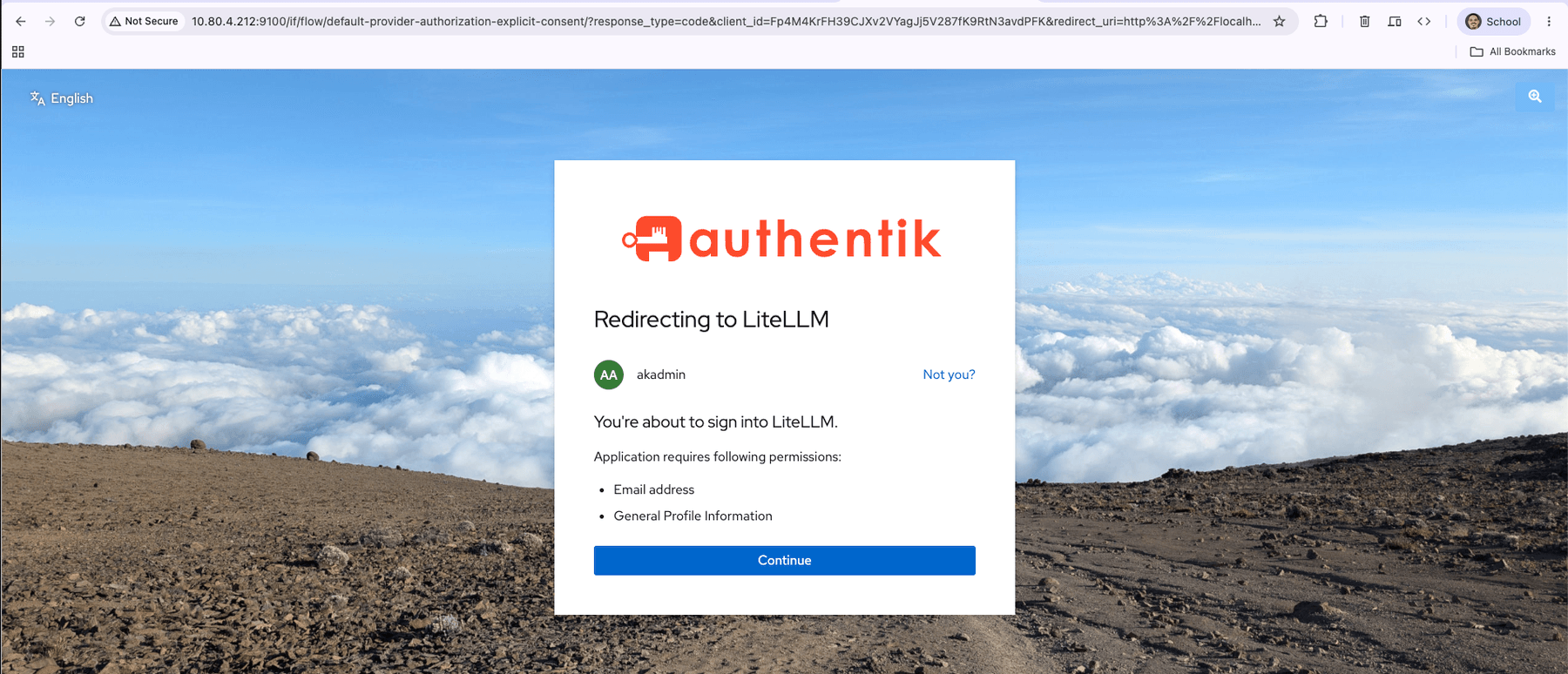
Sign in as akadmin, who is in gateway-admins. authentik shows the consent screen from
Part 3's explicit-consent flow, and you land in the dashboard at /ui/?login=success.
Now contractor.
Opening "a new private window" while another is already open reuses the same cookies, so authentik signs you back in as the previous user. The symptom is an instant login that looks like your access control failed. Close every incognito window, or use a different browser.
Permission denied. Request has been denied.
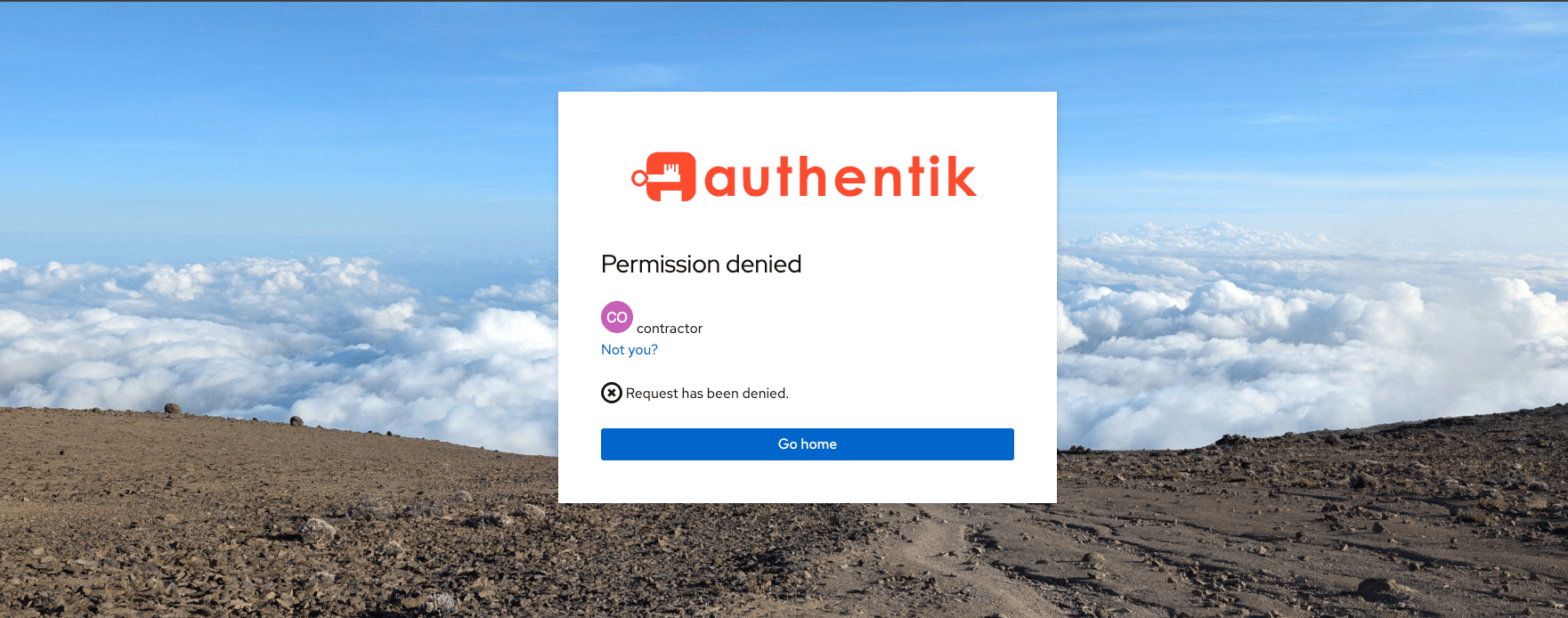
Note where that happened: authentik refused before the consent screen. The policy check
runs ahead of consent, so a blocked user never sees the permissions page — which is also how
we caught the missing bindings earlier. When contractor reached a consent screen, that was
the tell.
The part that is not closed
From a shell on the box — no authentik account, no session, no group, nothing but a key:
curl -s http://127.0.0.1:4000/v1/chat/completions -H "Authorization: Bearer sk-..." -H "Content-Type: application/json" -d '{"model":"qwen-mid","messages":[{"role":"user","content":"Say OK."}]}' | jq '{model, answer: .choices[0].message.content}'
{
  "model": "qwen-mid",
  "answer": "\n\nOK"
}
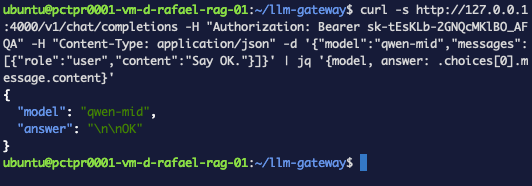
Nothing is broken. SSO never applied to that endpoint. Steps 1–5 protected /ui — the
control plane, where humans create keys and read spend. The data plane at /v1/*
authenticates machine callers with API keys, and it has to: an agent running at 3am can't
complete a browser login with a consent screen.
That key was itself created from a shell, with the master key, while no SSO session existed anywhere:
cd ~/llm-gateway && source .env && curl -s http://127.0.0.1:4000/key/generate -H "Authorization: Bearer $LITELLM_MASTER_KEY" -H "Content-Type: application/json" -d '{"key_alias":"sso-demo","models":[]}' | jq -r '.key'
The consequences, stated plainly, because "we put SSO on the gateway" gets said in meetings as though it settled the question:
- Removing someone from
gateway-adminsdoes not revoke their keys. They lose the UI and keep every key they made. Offboarding is two actions; only one is the one people remember. - A leaked key is unaffected by identity entirely. No session to expire, no group to remove it from.
- Keys outlive people, unless you gave them an owner and an expiry when you made them.
The gateway's own key model — scoped keys, budgets, expiry, per-key models — is what covers that ground, and it's a different mechanism from the one configured here. Complementary, not substitutable.
One more layer: getting in is not being able to do anything
Signed in as akadmin through SSO, the Virtual Keys page had no Create Key button.
LiteLLM assigns SSO users a default role that isn't admin. Passing authentik's binding got us into the UI; what we could do there is LiteLLM's own role model, which we never configured. Authentication, then authorization, then application-level roles — three distinct layers, and clearing one says nothing about the next.
Troubleshooting — the errors this run actually produced
Application matching query does not exist
The ak shell lookup fails even though the application is visibly there in the UI. The slug
isn't what you assumed — authentik derives it from the name, and a CamelCase name like
LiteLLM becomes lite-llm. Ask rather than guess:
cd ~/authentik && docker compose exec server ak shell -c "
from authentik.core.models import Application
for a in Application.objects.all():
    print(repr(a.name), '->', repr(a.slug))
" 2>/dev/null | tail -5
Redirect URI Error
authentik refuses before any login form. The redirect_uri in the address bar is what
LiteLLM sent; the Strict value on the provider is what authentik expects. Ours disagreed
because PROXY_BASE_URL said one host and the registered URI said another. Print what's
registered and compare character by character:
cd ~/authentik && docker compose exec server ak shell -c "
from authentik.core.models import Application
p = Application.objects.get(slug='lite-llm').get_provider()
for r in p.redirect_uris:
    print(repr(r.matching_mode), repr(r.url))
" 2>/dev/null | tail -5
If you edit it and the error persists, Applications → Clear cache — authentik caches provider config.
ERR_CONNECTION_REFUSED on localhost:4000
The tunnel isn't forwarding, even though ssh connected. If something already held the local
port, ssh printed bind: Address already in use and carried on with a working shell and a
dead forward. Check the port, then restart the tunnel:
lsof -nP -iTCP:4000 -sTCP:LISTEN
The user I expected to be refused got in
Two causes, both real here. Either a stray user binding grants them directly — policy engine mode ANY means one passing rule is enough — or the bindings were never saved. Ask the database, not the UI:
cd ~/authentik && docker compose exec server ak shell -c "
from authentik.core.models import Application
app = Application.objects.get(slug='lite-llm')
bs = list(app.bindings.all())
print('binding count:', len(bs))
for b in bs:
    print('group', b.group, '| user', b.user, '| enabled', b.enabled, '| negate', b.negate)
" 2>/dev/null | tail -5
A user who reaches the consent screen has already passed the policy check — that's the tell. A blocked user never gets that far.
The refused user logs straight in without a prompt
Browser session, not policy. All Chrome incognito windows share one session, so opening "a new private window" while another is open keeps the previous user signed in. Close every incognito window, or use a different browser.
No Create Key button in the admin UI
You're signed in through SSO, and LiteLLM gives SSO users a default role that isn't admin. Create keys from the shell with the master key, or configure LiteLLM's own roles — a separate mechanism from anything authentik does.
You can tell a control plane from a data plane on your own stack: put SSO and group membership in front of an admin UI, then prove the API behind it still answers on a key alone — and name what that means for offboarding, leaked keys and keys that outlive people.
What this did and didn't buy you
Done: a group that means something, a binding that enforces it and that we verified in the database rather than trusting a table, and an admin UI where access follows membership.
Not done:
- The API is untouched, by design, as demonstrated.
- The master key still logs in, bypassing all of it.
- SSO users have no LiteLLM role beyond the default.
- Still plain HTTP. Every token and secret here crosses the network in the clear.
- No MFA.
What's next
TLS and real exposure. The gateway is on 127.0.0.1:4000 and reachable in this post only
through an SSH tunnel; authentik is plain HTTP. Making either properly reachable means a
reverse proxy, a hostname and a certificate — and every redirect URI, PROXY_BASE_URL and
issuer changes the day that happens.