Firewall an agent container so it can reach one API and nothing else

- 1Lock down Docker networks
- 2Run containers as non-root
- 3Identity in front of every port
- 4Membership, not just an account
- 5An identity for the agent, not a key
- 6A tool server that checks who is asking
- 7Where the agent can go, not just what it can call
- 8Move the daemon off root
- 9Run the model's own code without trusting it
- 🏆A scope per tool, and a refusal clients can act on
Agent orchestration part 4 split a toolbox so the scheduler could not issue refunds. Part 5 gave the agent an identity at the gateway. Part 6 put a JWT verifier in front of the tools server so it refuses anonymous callers.
Every one of those controls what the agent may call. Not one of them controls where the agent may go.
That distinction is the whole of this post. Exfiltration does not need a tool. It needs a socket.
One WEC Instance: 8 vCPU AMD EPYC 7601, 15 GB RAM, Ubuntu 22.04, kernel 5.15. Docker
29.1.3 with firewall backend iptables — which on this distribution is iptables-nft
v1.8.7, a shim writing into nftables. Sandbox container is alpine:3.20. UFW is active.
Every status code, error string and timing in this post is from the run described. Plain HTTP on a private LAN where the LAN appears, as throughout this series.
Two directions, and only one is usually guarded
A firewall decides which packets may cross a boundary. Most of the time people mean it in one direction — ingress, who out there may reach in to your service. That is what publishing a port does, and what part 1 of this series was about.
Egress is the other direction: where your service may reach out to. Which addresses it may open a connection to, and which it may not.
Hardly anyone configures egress, and for an ordinary web application that is a reasonable choice. It talks to its database and a payment provider, it does what its code says, and its code does not change between deployments.
An agent is not that. An agent decides what to do at runtime, from text it has just read — an email, a support ticket, a web page, a document somebody else wrote. If an attacker controls that text, they influence what the agent does next. And the thing you do not want it doing next is exfiltration: sending your data somewhere it should not go.
Exfiltration needs no special tool. Any process that can open a socket can send anything it can read. Which is why the direction nobody guards is the one that matters here.
What the standards actually say
The leading reference for this class of problem is OWASP's LLM06:2025 Excessive Agency. Its prevention section lists, in order: minimize extensions, minimize extension functionality, avoid open-ended extensions, and further items about permissions and human approval.
Read the page looking for the network and it is not there. Not "egress", not "firewall", not "network", not "isolation", not "sandbox" — the words do not appear in the entry at all.
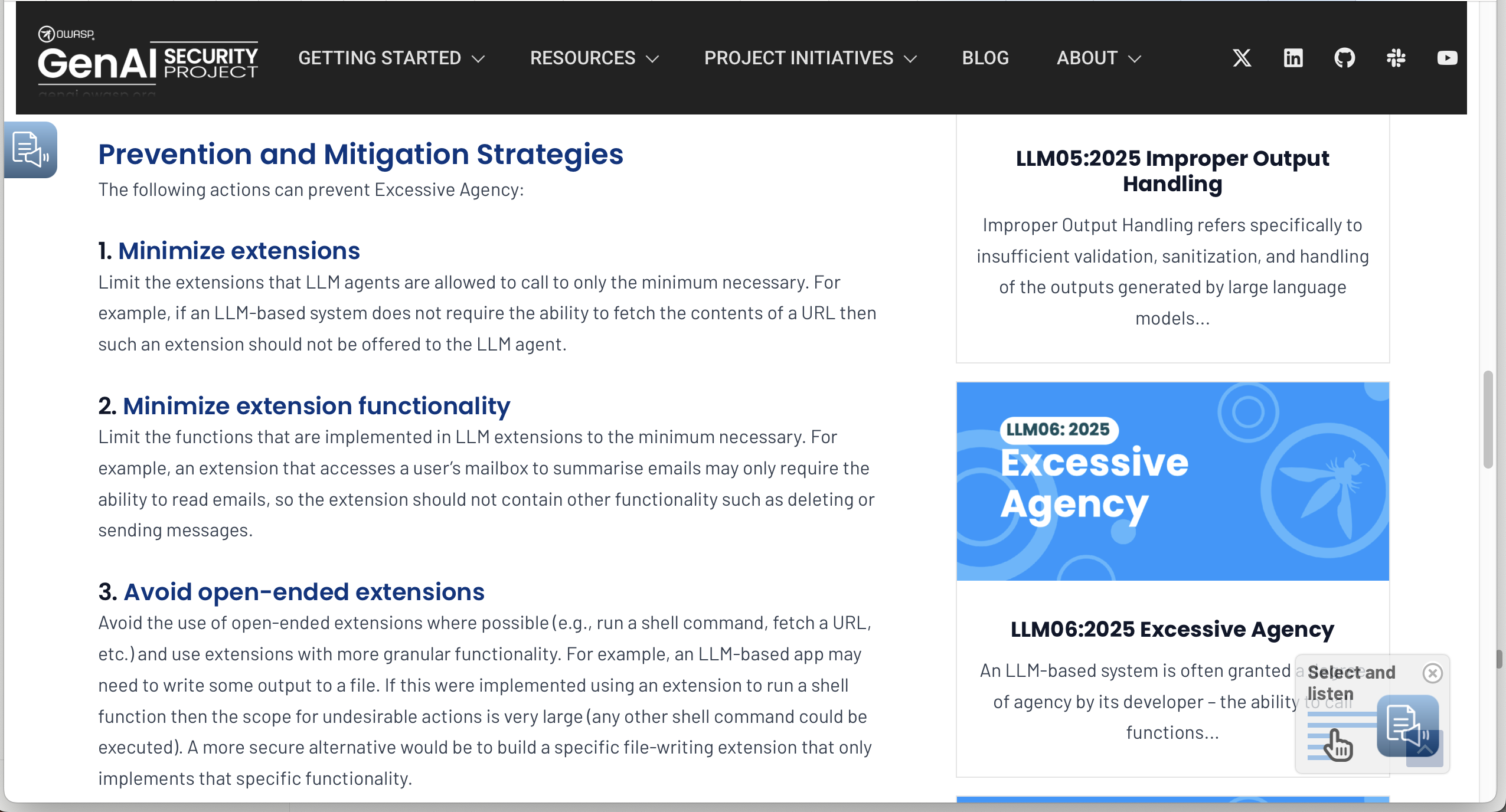
Every mitigation on that list operates on tools. Remove the extension, narrow the extension, avoid the open-ended extension. All good advice. None of it changes a single byte of what a compromised process can do with a TCP socket.
There is an argument that this is a gap rather than an oversight, and it is being made inside OWASP's own repository. An open issue proposing a runtime-enforcement mapping for the Agentic Top 10 states it plainly:
The enforcement pipeline assumes agents cannot reach tools without passing through the proxy. If tools are directly reachable, runtime enforcement collapses.
and concludes that "Network-level controls (e.g., Kubernetes NetworkPolicy, Docker network isolation) are required to close this gap in production."
Note what that is: an open issue, filed by a contributor, with its mapping marked (Proposed). It is not the standard. It is someone arguing the standard should say this.
And the reason this matters is not theoretical. EchoLeak (CVE-2025-32711) is a zero-click indirect prompt injection against Microsoft 365 Copilot, recorded in NVD as "Ai command injection in M365 Copilot allows an unauthorized attacker to disclose information over a network." Over a network. The tool list was never the thing that failed.
Prerequisites
- Docker on Linux with the
iptablesfirewall backend — the default. Check withdocker info | grep -i "Firewall Backend" sudo, and a willingness to write firewall rules on a box you can still reach- Nothing from the earlier parts. This one stands alone.
DOCKER-USER is real firewall state on your host. A rule that matches more than you intended
will take services offline. Every rule in this post is scoped with -i br-agent, an interface
that belongs to one purpose-built network — which is exactly why we name that bridge by hand
in step 1 instead of letting Docker generate one.
If you are working over SSH, none of these rules touch the INPUT chain, so your session is
not at risk. Confirm that for yourself before you believe it.
Step 1 — Prove the gap
A network, with the bridge interface named explicitly. Docker documents the option as "Interface name to use when creating the Linux bridge":
docker network create --driver bridge \
  -o com.docker.network.bridge.name=br-agent agent-egress
ip -br link show br-agent
br-agent DOWN 8a:77:65:54:9b:0d <NO-CARRIER,BROADCAST,MULTICAST,UP>
DOWN, because nothing is plugged into it yet. A Docker network is an interface that does
not come up until a container attaches, and a rule matching -i br-agent on an idle network
silently matches nothing. Worth knowing before you spend an hour debugging a policy that was
never exercised.
The sandbox — pinned, not latest:
docker run -d --name agent-sandbox --network agent-egress alpine:3.20 sleep infinity
docker exec agent-sandbox apk add --no-cache curl bind-tools
Now four destinations. Note what is not in this container: no agent, no framework, no MCP client, no tools. Tool scoping is not being bypassed here — there is nothing to bypass.
docker exec agent-sandbox curl -sS -m 8 -o /dev/null -w 'inference API   HTTP %{http_code}\n' https://inference.wiline.com/v1/models
docker exec agent-sandbox curl -sS -m 8 -o /dev/null -w 'arbitrary host  HTTP %{http_code}\n' https://example.com
docker exec agent-sandbox curl -sS -m 8 -o /dev/null -w 'authentik LAN   HTTP %{http_code}\n' http://10.80.4.212:9100/
docker exec agent-sandbox curl -sS -m 8 -o /dev/null -w 'other network   exit=%{exitcode} %{errormsg}\n' http://172.21.0.2:5432/
inference API   HTTP 401
arbitrary host  HTTP 200
authentik LAN   HTTP 302
other network   exit=28 Connection timed out after 5002 milliseconds
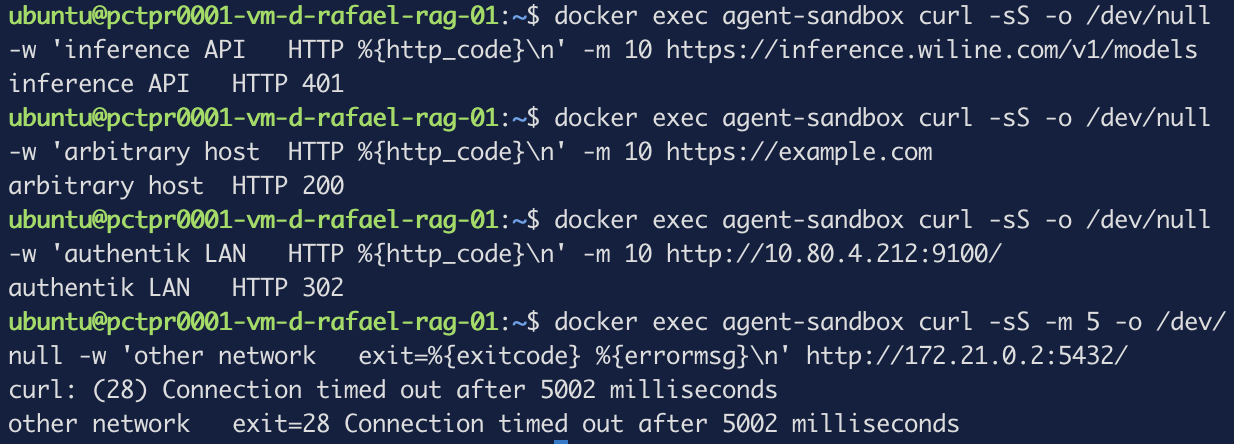
The 401 is the useful one to understand. No API key was sent, so the request never reaches
anything that could charge for it — but a 401 is an HTTP response, which means the TCP
handshake completed, TLS negotiated, and a real server answered. Reachability, proven, for
free.
The fourth line is the one that keeps this honest. That is a Postgres container on a different Docker network, and it times out — part 1 of this series established that separate bridge networks genuinely isolate, and this confirms it.
So the shape of the hole is precise rather than vague:
| Destination | Result | |
|---|---|---|
| Another Docker network | timeout | Docker already handles this |
| Your own LAN, including the identity provider | 302 | open |
| The open internet | 200 | open |
| The one API it actually needs | 401 | open |
Docker isolates containers from each other and stops there. The two directions that matter for exfiltration — your network, and the internet — are wide open, and no Docker guide frames that as a gap because, for a web application, it isn't one.
Step 2 — The floor
One rule. Note -A rather than -I: the deny goes at the bottom of the chain and stays
there, and every allow added later stacks above it. That ordering is the policy.
sudo iptables -A DOCKER-USER -i br-agent -j DROP
DOCKER-USER is where this belongs, and Docker's documentation is explicit about why:
Rules appended to the
FORWARDchain will be processed after Docker's rules.
DOCKER-USER is processed before them — the docs describe it as "a placeholder for
user-defined rules that will be processed before rules in the DOCKER-FORWARD and DOCKER
chains." Anywhere else and Docker's own ACCEPT gets there first.
Read that left to right and the placement explains itself. DOCKER-FORWARD holds one
unconditional ACCEPT per bridge — that is what makes container egress work at all, and it is
why a rule appended to FORWARD never fires. DOCKER-USER is the only hook that sits upstream
of it.
Re-run the same four probes:
inference API   exit=28 Resolving timed out after 8000 milliseconds
arbitrary host  exit=28 Resolving timed out after 8002 milliseconds
authentik LAN   exit=28 Connection timed out after 8003 milliseconds
other network   exit=28 Connection timed out after 8002 milliseconds
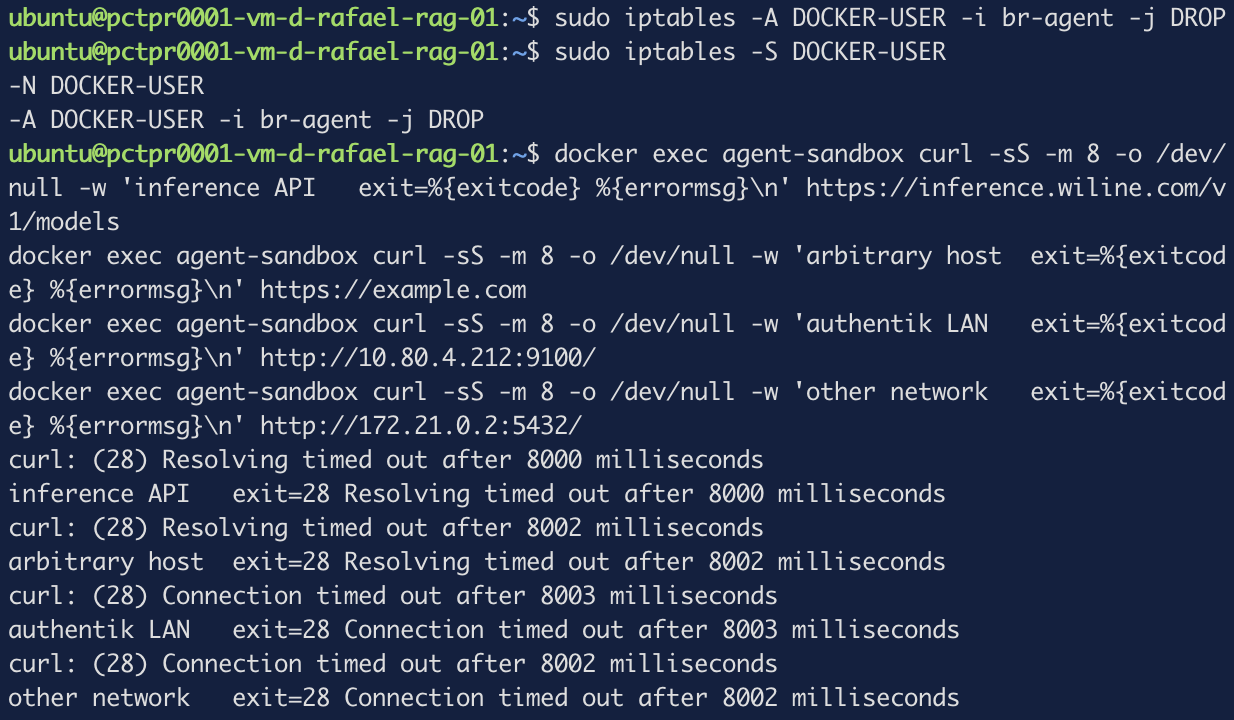
Read the error text, not the failure. Two different messages, and the difference is free diagnostic information:
- "Resolving timed out" — DNS itself was blocked. We never learned an address.
- "Connection timed out" — the address was already known, the packet left, the drop caught it.
The two by-name probes died at resolution; the two by-IP probes died at the socket. Which
tells us something not obvious: Docker's embedded resolver forwards its upstream queries
across DOCKER-USER. The resolver lives at 127.0.0.11 inside the container's namespace,
and it is tempting to assume that traffic never touches the host's forward path. It does.
Also note that every failure took the full eight seconds. A DROP produces timeouts; a
REJECT fails instantly. Stealth against debuggability, and this post chooses stealth — but
if you are still iterating on a policy, REJECT will save you a great deal of waiting.
Step 3 — The allowlist
Before writing a rule for the resolver, find out which resolver the container actually uses:
docker exec agent-sandbox cat /etc/resolv.conf
nameserver 127.0.0.11
search corp.internal internal mesh.example.com
options edns0 trust-ad ndots:0

# Based on host file: '/etc/resolv.conf' (internal resolver)
# ExtServers: [8.8.8.8 8.8.4.4]
ExtServers: [8.8.8.8 8.8.4.4]. The container is not using this network's DNS. The host
resolves through systemd-resolved on 127.0.0.53, which is a loopback address and therefore
useless inside a container's namespace, so Docker substituted Google Public DNS without
mentioning it.
Look at the inherited search domains in the same block (redacted here, but real on your box).
Every internal hostname that container looks up is being asked of 8.8.8.8, suffixed with the
private domains it inherited from the host. Nobody chose that, and nothing surfaces it except
reading this file.
It also decides the rule: allow the resolver the container has, not the one you assumed.
getent hosts inference.wiline.com
67.207.107.229 inference.wiline.com
sudo iptables -I DOCKER-USER -i br-agent -p udp --dport 53 -d 8.8.8.8,8.8.4.4 -j ACCEPT
sudo iptables -I DOCKER-USER -i br-agent -p tcp --dport 53 -d 8.8.8.8,8.8.4.4 -j ACCEPT
sudo iptables -I DOCKER-USER -i br-agent -p tcp --dport 443 -d 67.207.107.229 -j ACCEPT
sudo iptables -S DOCKER-USER
-N DOCKER-USER
-A DOCKER-USER -d 67.207.107.229/32 -i br-agent -p tcp -m tcp --dport 443 -j ACCEPT
-A DOCKER-USER -d 8.8.4.4/32 -i br-agent -p tcp -m tcp --dport 53 -j ACCEPT
-A DOCKER-USER -d 8.8.8.8/32 -i br-agent -p tcp -m tcp --dport 53 -j ACCEPT
-A DOCKER-USER -d 8.8.4.4/32 -i br-agent -p udp -m udp --dport 53 -j ACCEPT
-A DOCKER-USER -d 8.8.8.8/32 -i br-agent -p udp -m udp --dport 53 -j ACCEPT
-A DOCKER-USER -i br-agent -j DROP
Five allows on one deny. The same four probes, a third time:
inference API   HTTP 401 exit=0
arbitrary host  exit=28 Connection timed out after 8002 milliseconds
authentik LAN   exit=28 Connection timed out after 8003 milliseconds
other network   exit=28 Connection timed out after 8001 milliseconds
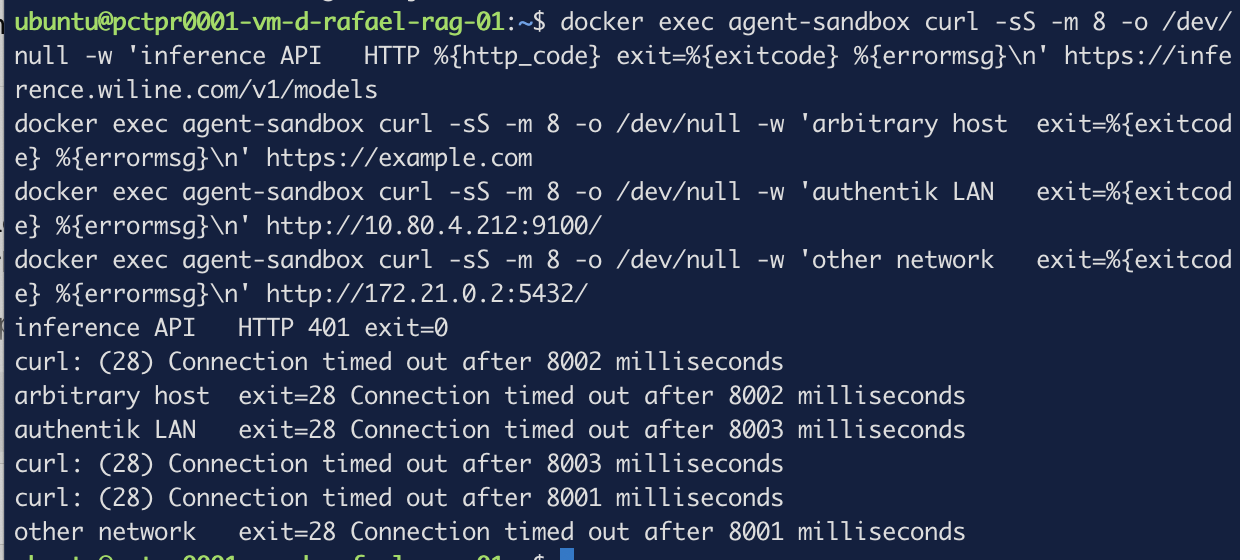
Look at line two. It says "Connection timed out", not "Resolving timed out". DNS is
open, so example.com resolved to a real address — and then the packet died. The lookup
succeeded and the socket did not.
That is the whole post in one line. A compromised process inside that container can discover where to send your data and cannot send it.
Every guide on this subject tells you to accept RELATED,ESTABLISHED traffic first, and
Docker's documentation shows the rule. This policy has no such rule, and the 401 above
proves the full TLS handshake and HTTP response came back anyway.
The reason is the direction. Our drop matches -i br-agent — traffic arriving from the
container. Return packets carry -o br-agent, never match it, pass through DOCKER-USER
untouched, and are accepted downstream by Docker's own connection-tracking rules.
You need the conntrack accept when your drop can match the return direction, which is the case in the ingress examples that advice comes from. A direction-specific egress drop does not. Add it anyway if you like — it costs nothing — but understand that copying it without understanding it is how people conclude firewall rules are black magic.
Step 4 — Measuring the cost, twice
A policy nobody measures is a policy someone will disable under load. So: what does six rules cost?
The obvious approach, twenty connects with the rules on, then twenty with them off:
for i in $(seq 20); do docker exec agent-sandbox curl -sS -o /dev/null -w '%{time_connect}\n' -m 8 https://inference.wiline.com/v1/models; done | sort -n | awk '{a[NR]=$1} END{printf "rules ON — median %.4fs min %.4fs max %.4fs (n=%d)\n", a[int(NR/2)+1], a[1], a[NR], NR}'
sudo iptables -F DOCKER-USER
rules ON  — median 0.1573s  min 0.0940s  max 0.3768s  (n=20)
rules OFF — median 0.0936s  min 0.0911s  max 0.1576s  (n=20)
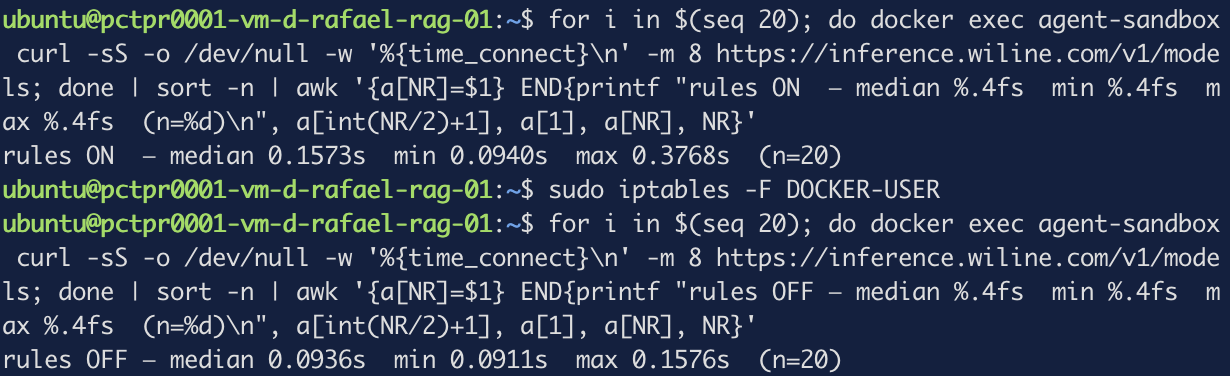
64 milliseconds. Which would be a serious finding, if it were true.
It is not. Six rules of packet matching is microseconds of kernel work, and the minimums give
the game away: 0.0940 against 0.0911, near-identical. The fast path is the same in both
runs. The entire difference lives in the tail.
curl's time_connect is measured from the start of the request and therefore includes name
resolution. The first run paid a full round trip to 8.8.8.8. By the second, the resolver
had the answer cached. We measured the order we ran them in.
Measure the TCP connect alone, by subtracting the lookup:
for i in $(seq 30); do docker exec agent-sandbox curl -sS -o /dev/null -w '%{time_namelookup} %{time_connect}\n' -m 8 https://inference.wiline.com/v1/models; done | awk '{print ($2-$1)}' | sort -n | awk '{a[NR]=$1} END{printf "connect-only median %.5fs min %.5fs max %.5fs (n=%d)\n", a[int(NR/2)+1], a[1], a[NR], NR}'
rules ON  — connect-only median 0.07098s  min 0.06999s  max 0.08607s  (n=30)
rules OFF — connect-only median 0.07102s  min 0.06996s  max 0.07214s  (n=30)
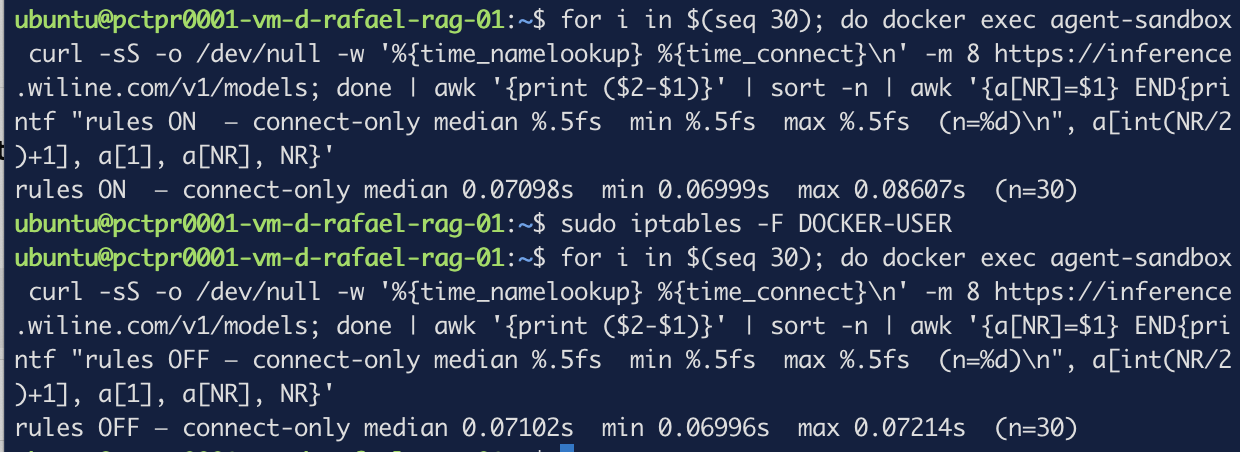
A median difference of −0.04 ms. Negative: the firewalled path measured marginally faster, which is what noise looks like. Everything sits inside about ±40 µs.
So the honest answer is not a number with a plus sign in front of it. It is that the cost of this policy is below what this method can resolve — and that the naive version of the same measurement was wrong by three orders of magnitude, in the direction that would have talked you out of deploying it.
Step 5 — Surviving a reboot
iptables rules live in memory. That -F in the last step did to the policy exactly what a
reboot does.
The reflex is iptables-persistent, and it is the wrong tool here: it saves the whole table
including every rule Docker generated, and Docker regenerates those itself at start. You get
duplicates and an ordering nobody chose.
What you want is a unit that owns only your rules and runs after Docker:
#!/usr/bin/env bash
# Egress allowlist for the agent bridge. Re-applied after Docker starts.
set -euo pipefail

BR=br-agent
DNS="8.8.8.8 8.8.4.4"
API=$(getent hosts inference.wiline.com | awk '{print $1; exit}')

# Remove only our own rules, so this is safe to run twice.
# `|| true` matters: on a clean chain grep exits 1 and would abort the script.
existing=$(iptables -S DOCKER-USER | grep " -i ${BR} " || true)
if [ -n "${existing}" ]; then
  printf '%s\n' "${existing}" | sed 's/^-A /-D /' |
    while read -r rule; do iptables ${rule} || true; done
fi

for d in ${DNS}; do
  iptables -I DOCKER-USER -i "${BR}" -p udp --dport 53 -d "${d}" -j ACCEPT
  iptables -I DOCKER-USER -i "${BR}" -p tcp --dport 53 -d "${d}" -j ACCEPT
done
iptables -I DOCKER-USER -i "${BR}" -p tcp --dport 443 -d "${API}" -j ACCEPT
iptables -A DOCKER-USER -i "${BR}" -j DROP
[Unit]
Description=Egress allowlist for the agent bridge
After=docker.service
Requires=docker.service

[Service]
Type=oneshot
RemainAfterExit=yes
ExecStart=/usr/local/sbin/agent-egress.sh

[Install]
WantedBy=multi-user.target
sudo chmod +x /usr/local/sbin/agent-egress.sh
sudo systemctl daemon-reload && sudo systemctl enable --now agent-egress.service
Prove it is idempotent by restarting it and comparing the chain to itself:
sudo systemctl restart agent-egress.service && sudo iptables -S DOCKER-USER
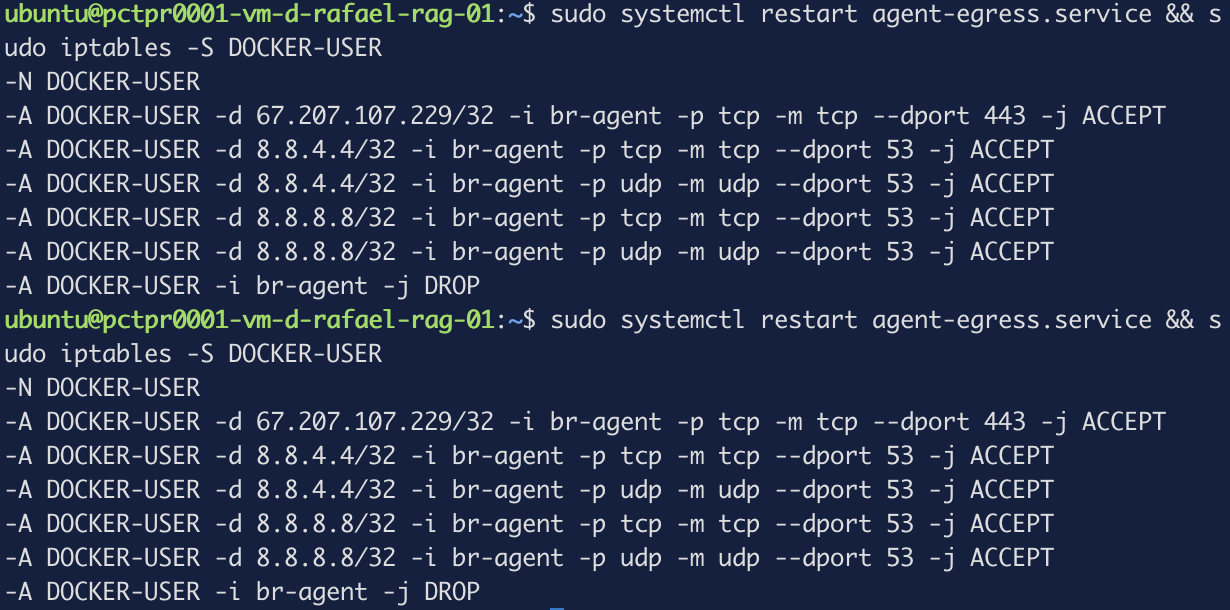
Six rules, twice, no duplicates.
Two things this buys quietly. getent runs on every start, so the API address is re-resolved
at boot — not continuous, but the cheap majority of the moving-target problem with no extra
daemon. And the delete loop strips only rules matching -i br-agent, so the unit never touches
anything else in the chain.
You can put a default-deny egress policy in front of a container, allow exactly the destinations it needs, tell a DNS failure apart from a socket failure by reading the error, measure the cost without fooling yourself, and make the whole thing survive a reboot.
If you switch Docker to the nftables backend
Docker 29 ships an nftables firewall backend alongside iptables. It is not the default and this post did not run it — the switch rebuilds every rule on the host, and verifying the full behaviour needs a reboot. What follows is from Docker's documentation, flagged as such.
Everything above stops applying, because:
In Docker's nftables implementation, there is no
DOCKER-USERchain.
You create your own table instead, and the priority does the work DOCKER-USER used to:
If your rules need to run before Docker's rules, give the base chains a lower priority number than Docker's chain.
And a rule that would be final under iptables is not:
In nftables, an "accept" rule is not final. It terminates processing for its base chain, but the accepted packet will still be processed by other base chains, which may drop it.
Overriding Docker's drop then requires --bridge-accept-fwmark.
The trap worth knowing about is the transition, and it is quiet in both directions:
When starting the daemon with nftables after running with iptables, Docker will not remove the jump from the
FORWARDchain toDOCKER-USER. So, rules created inDOCKER-USERwill continue to run until the jump is removed or the host is rebooted. When starting with nftables, the daemon will not add the jump. So, unless there is an existing jump, rules inDOCKER-USERwill be ignored.
Switch backends and your policy keeps working — until the next reboot, when it silently stops.
iptables -S DOCKER-USER will still list every rule.
Troubleshooting — the errors this run actually produced
The systemd unit fails on its first run and works on the second
status=1/FAILURE with nothing else in the journal. The cleanup line is the cause: on an empty
chain, grep finds no matching rules and exits 1, which set -euo pipefail turns into an
abort before any rule is added. The idempotency guard breaks the one run that needs no
idempotency. See the || true in step 5.
Everything times out, including things you allowed
Check whether the failure says "Resolving" or "Connection". If it says Resolving, your DNS
rule is the problem and the destination rule was never reached. Containers frequently do not
use the resolver you expect — read /etc/resolv.conf inside the container, not on the host.
The rules are listed but nothing is filtered
Check that the bridge is up: ip -br link show br-agent. A network with no attached container
has a DOWN interface, and a rule matching -i on it matches nothing.
Everything takes exactly eight seconds to fail
That is DROP behaving correctly. Use REJECT while iterating if you would rather fail fast.
The measurement shows tens of milliseconds of overhead
You are measuring DNS. Use %{time_connect} minus %{time_namelookup}, and be suspicious of
any result where the minimums match but the medians don't.
What this did and didn't buy you
Done: a container that can reach exactly one destination and a resolver; an exfiltration attempt that fails after a successful DNS lookup rather than before it; a policy that reapplies itself after a reboot and re-resolves its target when it does; and a measured cost indistinguishable from zero.
Not done:
- DNS is still an exfiltration channel. We allowed queries to
8.8.8.8, and data can be smuggled inside them. Closing that means a resolver you control and a rule pointing only at it — which is a different post. - The allowlist is an IP, and IP addresses move. The unit re-resolves at boot, which is not the same as following a CDN. A forward proxy filtering on TLS SNI is the honest answer for a destination that rotates; it is also considerably more machinery.
- This protects containers. The agents in agent orchestration part 3 and part 4 run as host processes, where these rules do not apply. Moving them into a container is the prerequisite, and is worth doing on its own merits.
- The host is unrestricted, and so is every other container on this box. Five other bridges
still have an unconditional
ACCEPTinDOCKER-FORWARD. - Nothing here stops the injection. It stops the payload leaving. Those are different jobs.
What's next
The obvious sequel is the resolver: run one you control, point the container at it, allow port 53 only to that address, and the DNS channel closes along with the dependency on Google. It also sets up domain-based allowlisting properly, which is the piece of the moving-target problem this post left open.